



Before accepting real customer payments, you need to test your payment gateway and make sure your payment flow works as expected. Payment gateway testing helps you identify failed transactions, integration issues, payment errors, and other problems before they affect your customers.
In this guide, you’ll learn what payment gateway testing is, why it matters, what to test, common mistakes to avoid, and how to test Square payments on WordPress using WP Easy Pay.
What is a Payment Gateway?
A payment gateway is a secure technology that transmits payment information between customers, merchants, payment processors, and financial institutions. The payment gateway securely transfers transaction data to the payment processor, which handles payment authorization and processing.
There are several types of payment gateways, including hosted payment gateways, self-hosted payment gateways, and local bank integration gateways.
Popular payment gateways include Square, Stripe, PayPal, Authorize.Net, Razorpay, and Amazon Pay.
However, with hundreds of options available, choosing the right one can be difficult. If you need help, the article below can help you compare your options.
👉 Also Read: 7 Best Payment Gateways for Fast Online Transactions
Simply put, a payment gateway securely transmits payment information between the customer, merchant, and payment processing system.
Why Should You Test Payment Gateways?

You might think payment gateway testing only matters during the initial setup. However, treating it as a one-time task can lead to payment errors and integration issues after updates or configuration changes.
A few benefits of testing a payment gateway include:
- Helps prevent failed transactions: Testing helps you catch errors that might otherwise cause failed or declined payments.
- Enhances user experience: A smooth and reliable payment process keeps customers happy and encourages them to return.
- Exposes bugs early: Testing allows you to spot technical glitches or misconfigurations before they affect real customers.
- Validates your WordPress integration: Testing helps confirm that the payment gateway works correctly with your WordPress website and payment forms.
- Helps identify security and fraud-related issues: Testing can reveal potential vulnerabilities and payment issues that you can address before going live.
- Encourages trust with customers: When payments go through without a hitch, it builds confidence in your brand.
- Verifies multiple scenarios: From card declines to currency mismatches, testing lets you see how the system behaves under different situations.
Now that you understand the importance of testing payments, the following section will help you understand the components you must test to ensure your payment gateway works best.
Key Components of a Payment Gateway You Need to Test
While testing the payment gateway, put yourself in the user’s shoes and consider the different parts of the payment process that customers may interact with. Here’s what you need to test:
- Payment authentication: Test the authentication steps required during the payment process and verify that successful and failed authentication attempts produce the correct results.
- Payment processing: Payment processing involves multiple entities and a sequence of actions that work together to complete a transaction.
- Error handling: Even when your security and configuration are correct, errors can still occur. Therefore, test how the gateway handles declined payments, invalid information, timeouts, and other payment errors.
- Security and encryption: Payment gateways use security measures such as encryption, tokenization, authentication, and fraud detection tools to help protect payment data. You should also check which security features your payment provider supports.
- Response time and support: Last but not least, before choosing a payment gateway, check its response time and make sure the support team is accessible. This can help prevent many issues in the long run.
Payment Gateway Test Cases to Run Before Launch
A complete payment gateway test should cover more than a successful card payment. Test the scenarios that match your payment methods, WordPress setup, and payment provider.
Successful Payment
Submit a valid test payment and confirm that the payment succeeds, the correct amount appears in the transaction record, and the customer sees the correct confirmation message.
Declined Payment
Use the payment provider’s test values to simulate a declined transaction. Verify that your payment form displays a helpful error and does not incorrectly mark the transaction as successful.
Invalid Payment Details
Test invalid card numbers, expired cards, incorrect security codes, and invalid billing information where the payment provider supports those test scenarios.
Failed Authentication
If your payment flow supports payment authentication or Strong Customer Authentication (SCA), test both successful and failed authentication scenarios.
Duplicate Submission
Submit the payment form more than once or simulate a repeated request to confirm that your integration does not create duplicate transactions.
Timeout or API Failure
Test how your website responds when the payment provider returns an error or the payment request takes longer than expected. The form should give customers a clear status instead of leaving them uncertain about whether the payment succeeded.
Webhook and Payment Status Updates
Test webhook notifications and verify that your WordPress site correctly handles successful, failed, pending, and other supported transaction states.
Refunds
Run a test refund when your payment provider and Sandbox environment support the scenario. Verify the refund status, transaction record, and customer-facing message.
Payment Methods
Test every payment method you plan to enable, including card payments and supported digital wallets or bank payment methods. Follow the provider’s specific Sandbox requirements for each method.
Mobile and Browser Compatibility
Test the payment form on common browsers and mobile devices. Check form fields, payment buttons, validation messages, and the complete payment flow.
Performance
Test your WordPress website under realistic traffic conditions before major campaigns or seasonal traffic spikes. Monitor page speed, server response time, and payment-form behavior rather than attempting to load-test the payment provider itself.
Manual vs. Automated Payment Gateway Testing
Not every test case deserves the same approach. Knowing when to test by hand and when to hand it off to a script is what separates a thorough QA process from a poor one.
- When manual testing makes sense:
Manual testing is best for exploratory checks, one-off UI verification, and scenarios where human judgment matters, such as confirming that an error message makes sense to customers or that a payment flow works smoothly on a new device.
It’s also the right call for low-frequency test cycles, such as verifying a gateway after a plugin update.
- When automated testing makes sense:
Automation earns its keep when you’re running the same test repeatedly. Regression checks after every deployment, load testing before a sales event, or validating dozens of currency combinations that would take hours to click through manually.
Recommended tools by use case:
| Use Case | Tool | Best For |
| Cross-browser/device testing | BrowserStack, Sauce Labs | Verifying checkout UI across real browser/OS combinations |
| API testing | Postman | Validating gateway API responses, webhooks, and error codes |
| Functional automation | Selenium, Cypress | Scripting repeatable end-to-end transaction flows |
| Load/performance testing | JMeter | Simulating peak traffic and stress-testing transaction throughput |
- For WordPress sites specifically:
Most WordPress store owners need confidence that the plugin works before going live. This is where WP Easy Pay’s built-in sandbox environment simplifies manual testing considerably:
You get a pre-configured Square sandbox connection, so you can run through successful payments, declines, refunds, and edge cases directly from your WordPress dashboard without setting up separate test infrastructure.
For many WordPress websites, this manual Sandbox workflow provides a practical way to test the core payment flow without the engineering overhead of automated testing.
The practical takeaway: start manual, especially with WP Easy Pay’s sandbox. Only reach for automation once you have repeatable test cycles or high-volume transaction testing needs.
Create a Payment Gateway Testing Checklist
Document each test case so you can repeat the process after future updates.
For each test, record:
- Test scenario: What payment behavior are you testing?
- Test data: Which Sandbox card or payment value did you use?
- Expected result: What should happen?
- Actual result: What happened during the test?
- Payment status: Did the provider mark the transaction correctly?
- Customer message: Did the payment form display the correct response?
- Webhook status: Did your WordPress site receive and process the expected notification?
- Action required: Did you find an issue that needs investigation or a fix?
This approach turns payment gateway testing into a repeatable QA process instead of a one-time check.
How to Perform Payment Gateway Testing in WordPress
As you know, there are multiple payment gateways. However, in this article, we will focus on the Square payment gateway.
One of the easiest ways to test Square payments on WordPress is to connect Square Sandbox with WP Easy Pay and run a test payment.
We can help you navigate the process, step by step. But before that, download WP Easy Pay from the WordPress plugin directory and follow the steps.
Step 1: Install and Activate WP Easy Pay
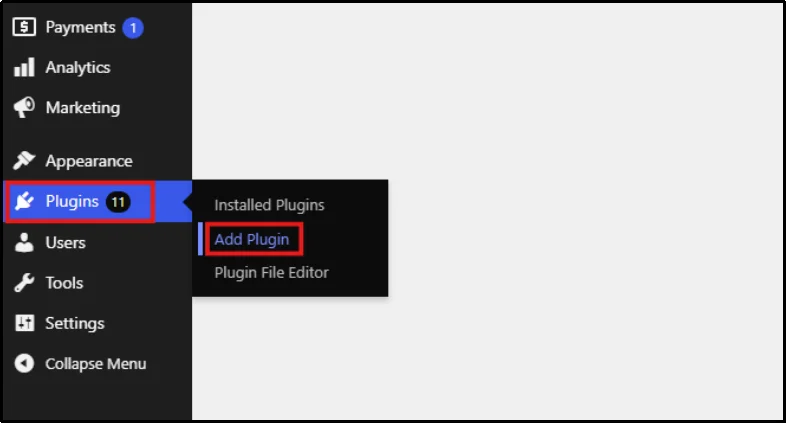
- Access your WordPress dashboard, hover over the Plugins tab, and click Add Plugin.
- In the search bar on the right, enter WP Easy Pay.
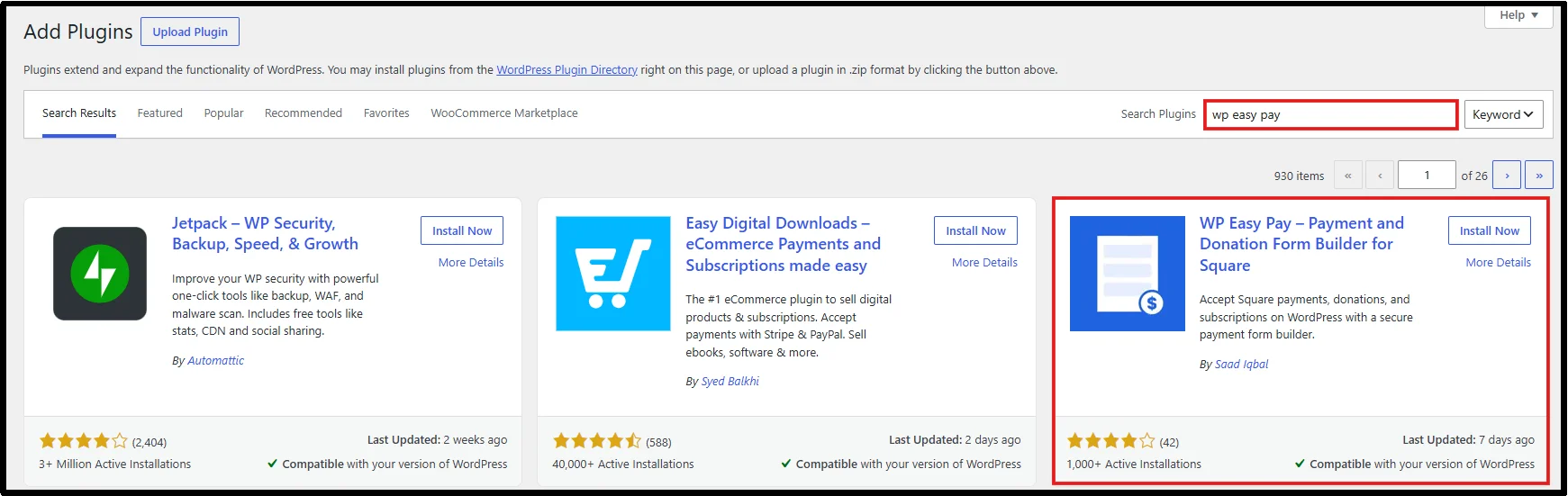
- Click the Install Now, then click Activate.
- Alternatively, if you bought the premium version, you can upload the plugin using the ‘Upload Plugin’ button.

- Choose your file from where you saved it on your device and use the ‘Install Now’ button.

- After installation, you will be prompted to Activate License.
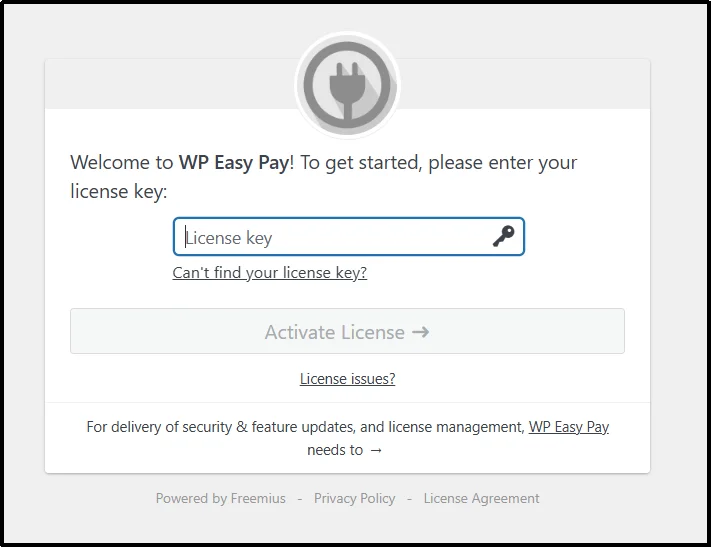
- Paste your License Key into the field. Click Agree & Activate License.
Step 2: Connect to Square Account
After installation and activation, connect your Square Sandbox account. This integration allows your WordPress website to accept and test payments through Square.
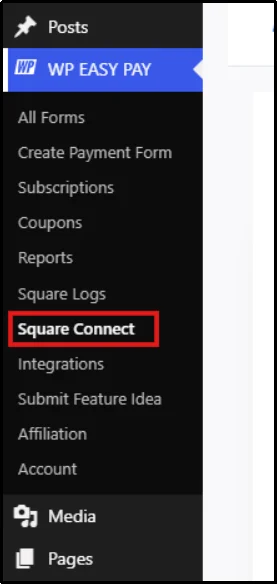
- Navigate to the plugin’s settings from the WordPress dashboard and select Square Connect.
⚠️ Note: Before proceeding, sign in to your Sandbox account in the same browser. Otherwise, the connection may not work correctly.
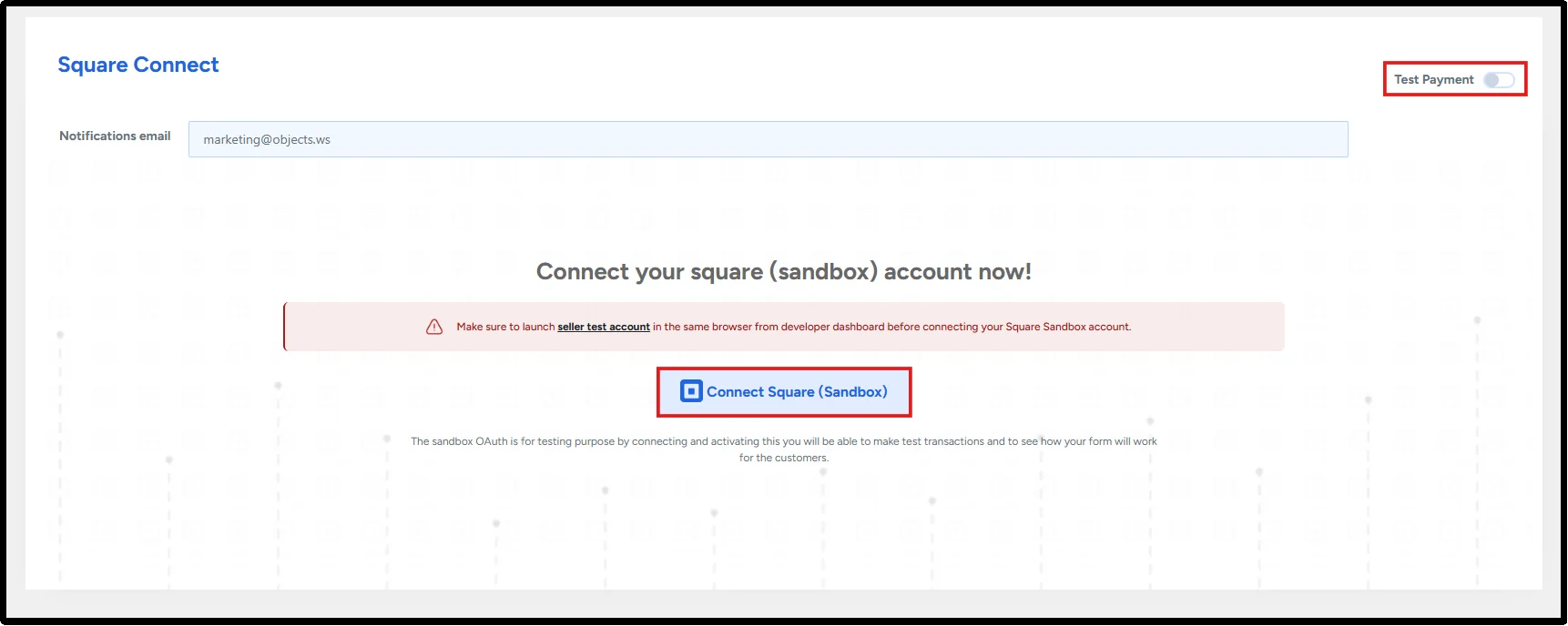
- Click Seller Test Account, then sign up or sign in.
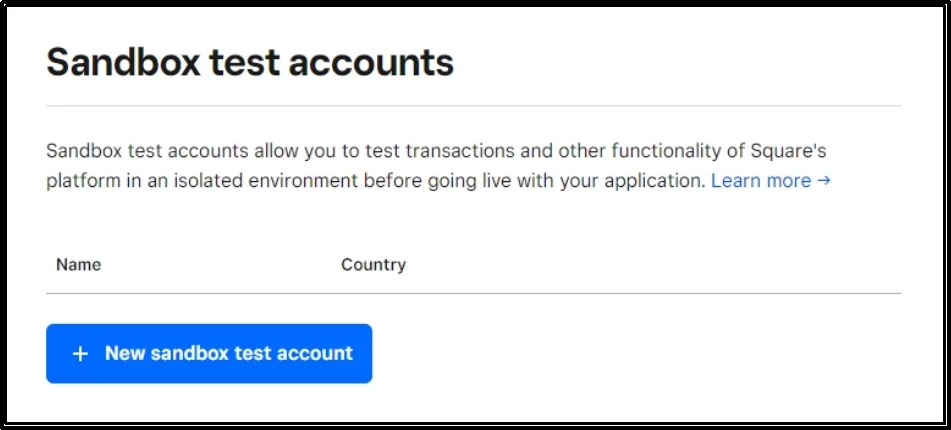
- Click New Sandbox Test Account. Once you create the test account, return to the Square Dashboard.
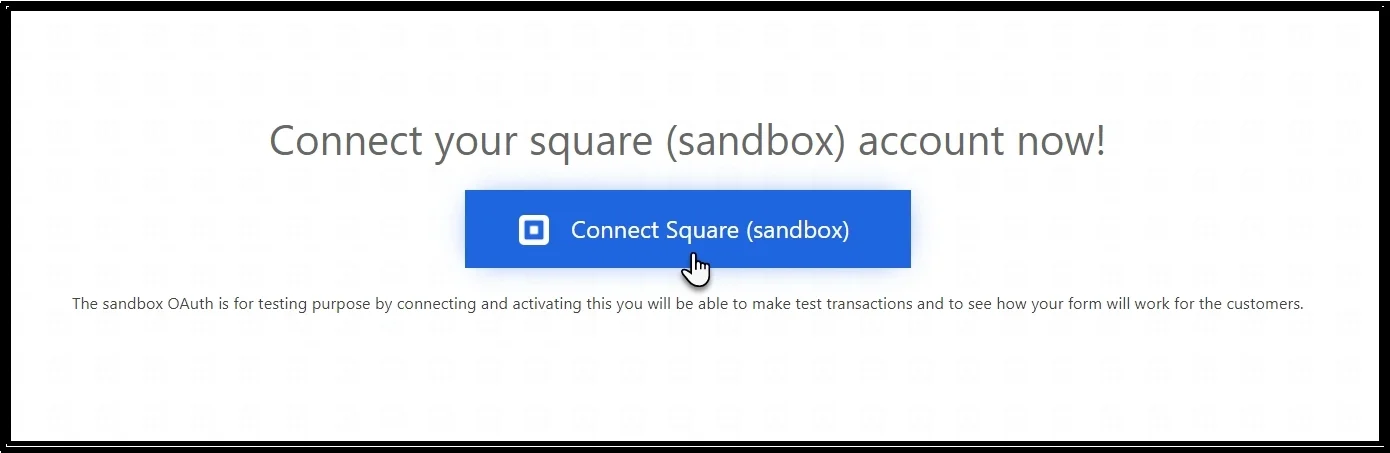
- Head back to WordPress → WP Easy Pay → Square Connect, and click on Connect Square (Sandbox).
- Log in to your Square account, then click on “That’s my site – Redirect Me”.

That’s it! You have successfully connected your Square account with WP Easy Pay.
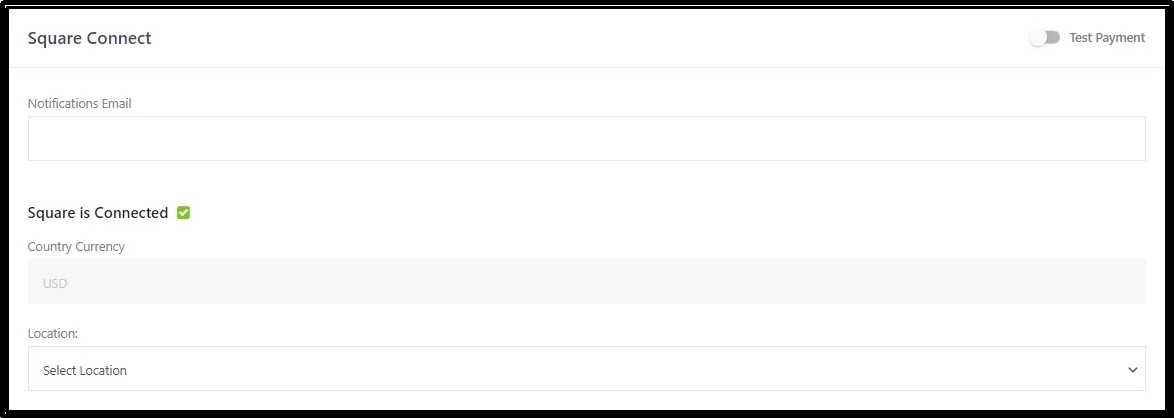
Step 3: Test the Payment Gateway
Now you can run a test payment through your WordPress payment form.
- Enable Test Payment using the toggle button in the top right corner.
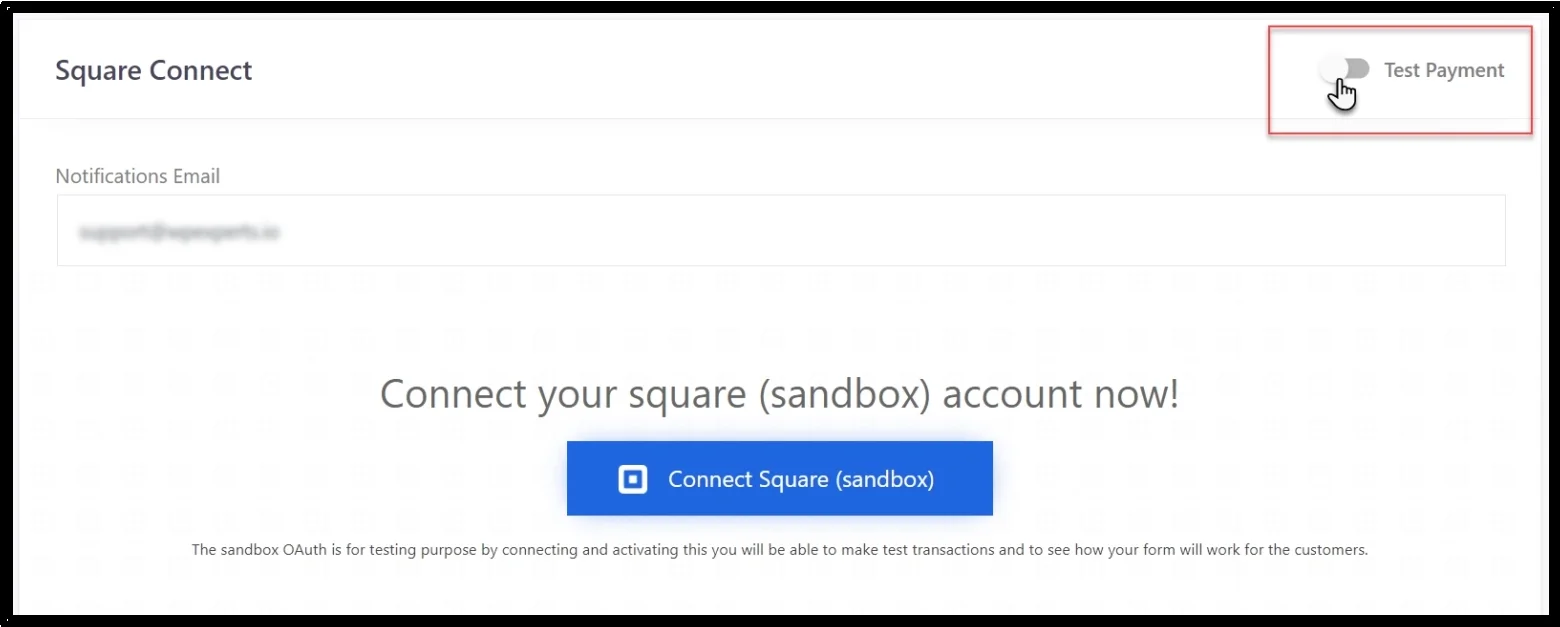
- Click the Connect Square (sandbox) button.
- Next, select the Default Test Account from the location drop-down.
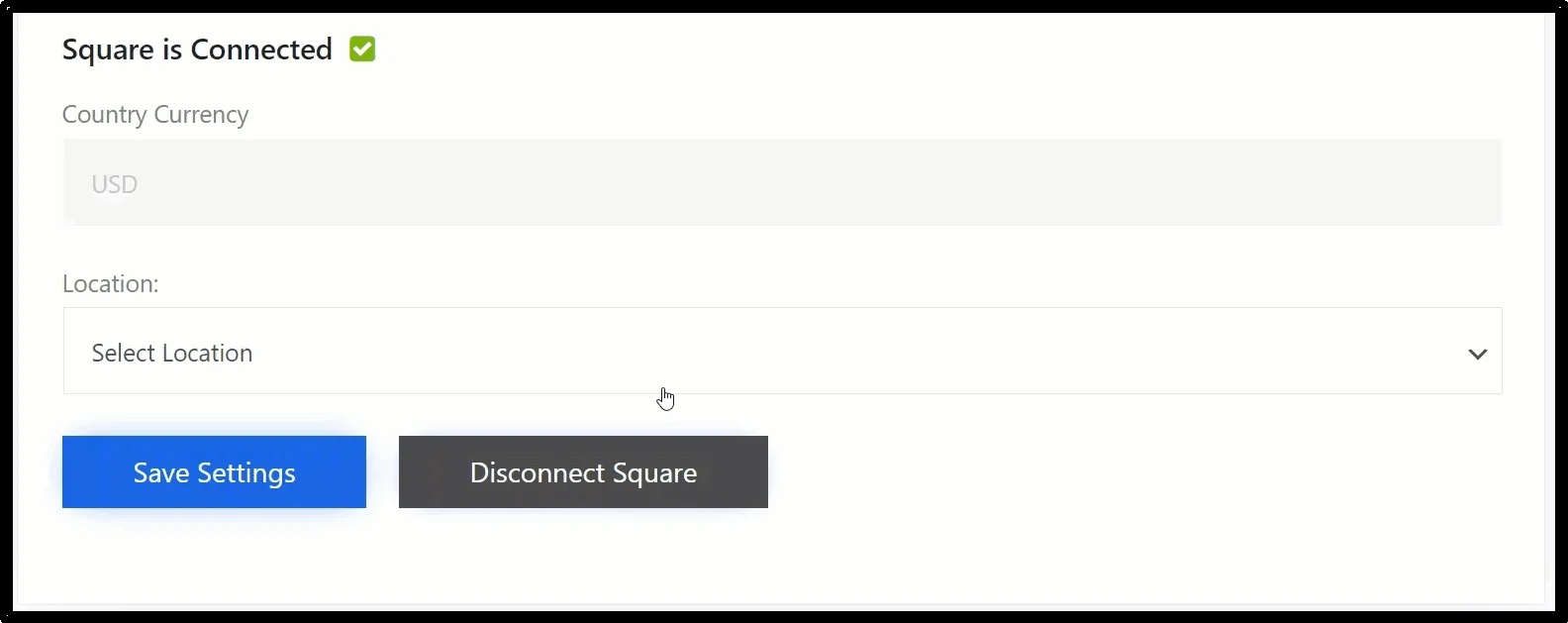
- Use the Save Settings button to save changes.
- Head back to WordPress and create a new payment form using the drag-and-drop WP Easy Pay block. You can select any payment option, including:
- Afterpay (BNPL)
- Apple Pay
- Google Pay (GPay)
- ACH Payments
- Cash App
Or you can select all of them and place the payment form on your WordPress page.
- Once done, head to the front-end and conduct payment gateway testing by entering the card details.
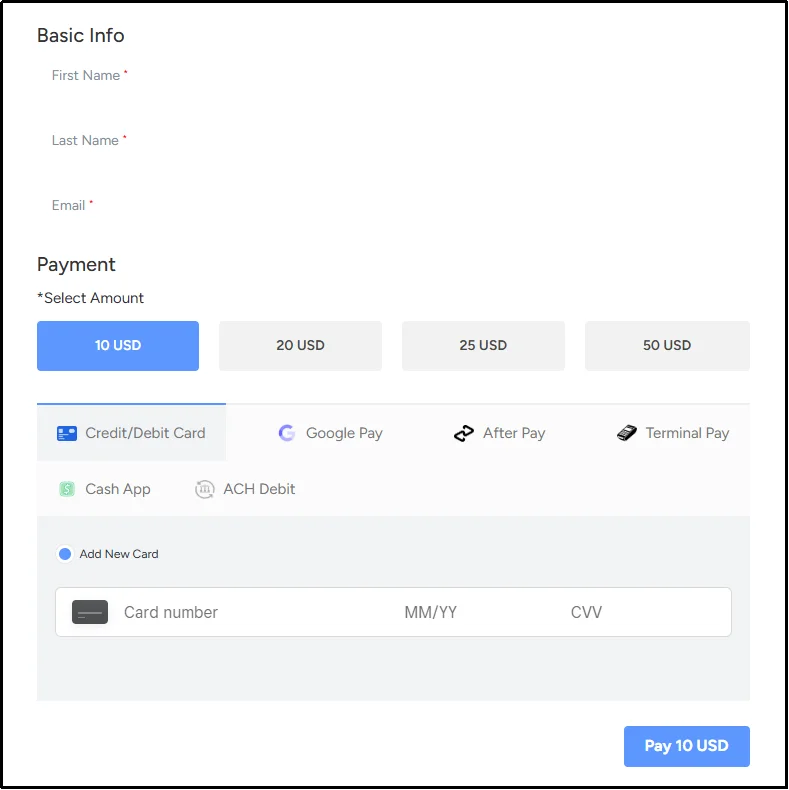
That’s it! If the test payment succeeds, you can move on to testing other payment scenarios before going live.
Common Payment Gateway Testing Mistakes to Avoid
Even experienced teams fall into predictable traps when testing payment gateways. Here are the mistakes that most often lead to problems after launch:
- Only testing the successful flow. It’s tempting to run one test card, see Payment Successful, and call it done. But real-world payment issues, such as declined cards, timeouts, and invalid input, can happen frequently.
- Ignoring webhook and delayed notifications. Many gateways confirm payments asynchronously. If you only check the immediate payment response and skip webhook testing, you can miss cases where a payment fails to update its transaction status.
- Relying only on Sandbox testing. Sandbox environments are essential, but they don’t always replicate every production scenario. Review your payment provider’s production requirements and test the live payment flow carefully before accepting real customer payments.
- Forgetting refund testing. Teams often test the payment side thoroughly and treat refunds as an afterthought. A broken refund flow creates support tickets and damages customer trust just as much as a broken checkout.
- Skipping performance testing. A payment system that works fine with one test transaction can behave differently under concurrent load, especially during sales, promotions, or seasonal spikes.
- Not documenting edge cases. Testing without a checklist means results live in someone’s memory instead of a repeatable process. When the plugin updates or the gateway changes, undocumented edge cases get retested from scratch, or missed entirely.
Avoiding these six mistakes is often the difference between a payment system that quietly works and one that generates support tickets during your busiest sales period.
Turn Payment Gateway Testing Into a Habit
Payment gateway testing is crucial for every business that handles online payments. A gateway that fails silently, mishandles a refund, or buckles under holiday traffic erodes trust.
Businesses that get this right share a common pattern: they test failure paths as carefully as success paths, document their edge cases instead of relying on memory, and build testing into their regular workflow rather than treating it as a one-time task.
If you’re running a WordPress store, you need a good payment gateway.
Try WP Easy Pay to connect Square with your WordPress website and test your payment forms in a Sandbox environment before accepting live payments.
Frequently Asked Questions
What is a payment gateway sandbox?
A payment gateway sandbox is an isolated testing environment that lets you simulate payment transactions without charging real customers. You can use it to test payment forms, transaction responses, integrations, and selected payment scenarios before switching to live mode.
How can I test a payment gateway without charging a real card?
You can test a payment gateway without charging a real card by connecting your integration to the provider’s Sandbox environment and using its official test payment values. For example, Square provides Sandbox card numbers and specific values that simulate successful and failed payment scenarios.
What should I test before launching a payment gateway?
Before going live, test successful and declined payments, invalid payment details, authentication, payment methods, refunds, webhook notifications, payment status updates, error messages, and the complete payment form flow.
What is the difference between a sandbox and a live payment gateway?
A Sandbox uses simulated payment transactions for testing, while the production environment processes real payments. Complete your planned Sandbox tests before switching your WordPress payment form to live mode, and follow your payment provider’s production-readiness requirements.
How often should I test my payment gateway?
Test your payment integration before launch, after major WordPress or plugin updates, when you add or change payment methods, after significant configuration changes, and before major campaigns or seasonal traffic increases.
Why do test transactions fail?
Test transactions can fail because of incorrect Sandbox credentials, unsupported test values, API configuration problems, authentication issues, webhook errors, or payment integration settings. Check the provider’s error response and your WordPress logs to identify the cause.
Can I test digital wallets like Apple Pay and Google Pay?
You can test supported digital wallets, but the testing process varies by payment provider and wallet. For example, Square supports Apple Pay and Google Pay, but its Sandbox requirements differ by payment method. Square notes that Apple Pay Sandbox testing uses a valid card from an Apple Pay Wallet rather than Square Sandbox test card values.
Does payment gateway testing improve website security?
Payment gateway testing can help identify configuration problems, unexpected payment behavior, authentication failures, and weaknesses in the payment flow. However, testing alone does not replace a broader security review, PCI DSS requirements, secure development practices, or the payment provider’s security controls.