


Running a nonprofit organization means balancing mission-driven work with the constant challenge of fundraising. No matter how impactful your cause is, your organization cannot grow without consistent donor support and a reliable online fundraising strategy.
Here’s the reality: many nonprofit websites lose potential donors because their donation checkout experience creates unnecessary friction, confusion, or trust concerns during the online giving process.
Over the years, we’ve helped nonprofits, charities, and community organizations optimize WordPress donation pages, improve donor conversion rates, and reduce donation abandonment through real-world fundraising UX improvements.
Across hundreds of donation form tests, we’ve seen how small UX improvements like simplifying forms, enabling recurring donations, and optimizing mobile checkout can significantly increase online fundraising revenue.
In this guide, we are sharing 9 proven strategies to increase donations on WordPress.
Why Most WordPress Donation Pages Fail
Before exploring these donation optimization strategies, it’s important to understand why many nonprofit websites struggle to convert visitors into donors.
According to the Fundraising Effectiveness Project, overall donor retention and donor participation continued to decline in recent years. So, the answer comes down to a lack of trust and, even if trusted, a poor user experience on your WordPress site.
Take a moment to imagine what happens when a donor visits your WordPress site.
They already feel motivated to support your cause.
Your job is to make the donation process as easy as possible. But when donors encounter long forms, unclear security signals, slow-loading pages, or confusing checkout experiences, many leave before completing their donation.
9 Proven Nonprofit Fundraising Strategies to Increase Donations on WordPress
Did you know that donation abandonment mirrors e-commerce cart abandonment? Every second of a slow donation page counts. If you really want to boost the amount of donations on your WordPress site, here are the 9 best strategies you should follow:
1. Make Your Donation Form Simple
The single most impactful change is to make your WordPress donation page form simple.
Many nonprofit organizations unintentionally reduce donation conversion rates by asking for unnecessary information at checkout. Most nonprofit donation forms only need a donor’s name, email address, donation amount, and secure payment information to complete the transaction successfully. Everything else can be collected later via a follow-up email or call.
When we talk about a donation form, the rule is: every additional field reduces conversions.
What a high-converting donation form looks like:
- Full name (first and last in one field)
- Email address
- Donation amount selector
- Payment information
- One-click submit button
A streamlined donation checkout flow reduces friction and helps supporters complete donations faster. A visitor should be able to complete a donation in under two minutes.
Pro tip: Add a newsletter opt-in checkbox that could easily go in a post-donation email. This helps you build long-term relationships with donors through future fundraising campaigns and updates.
2. Offer Multiple Donation Amounts
One of the most effective nonprofit fundraising optimization strategies is offering predefined donation amounts instead of forcing supporters to decide how much to give on their own.
When someone stares at a blank box and asks themselves, “How much should I give?”, the most common outcome is that they leave without donating at all.
How to structure your donation tiers:
Present four options, such as $25, $50, $100, and a custom amount, with a brief line under the form title explaining the impact (optional). Visitors who want to give more or less than the preset amount can opt for the custom amount option.
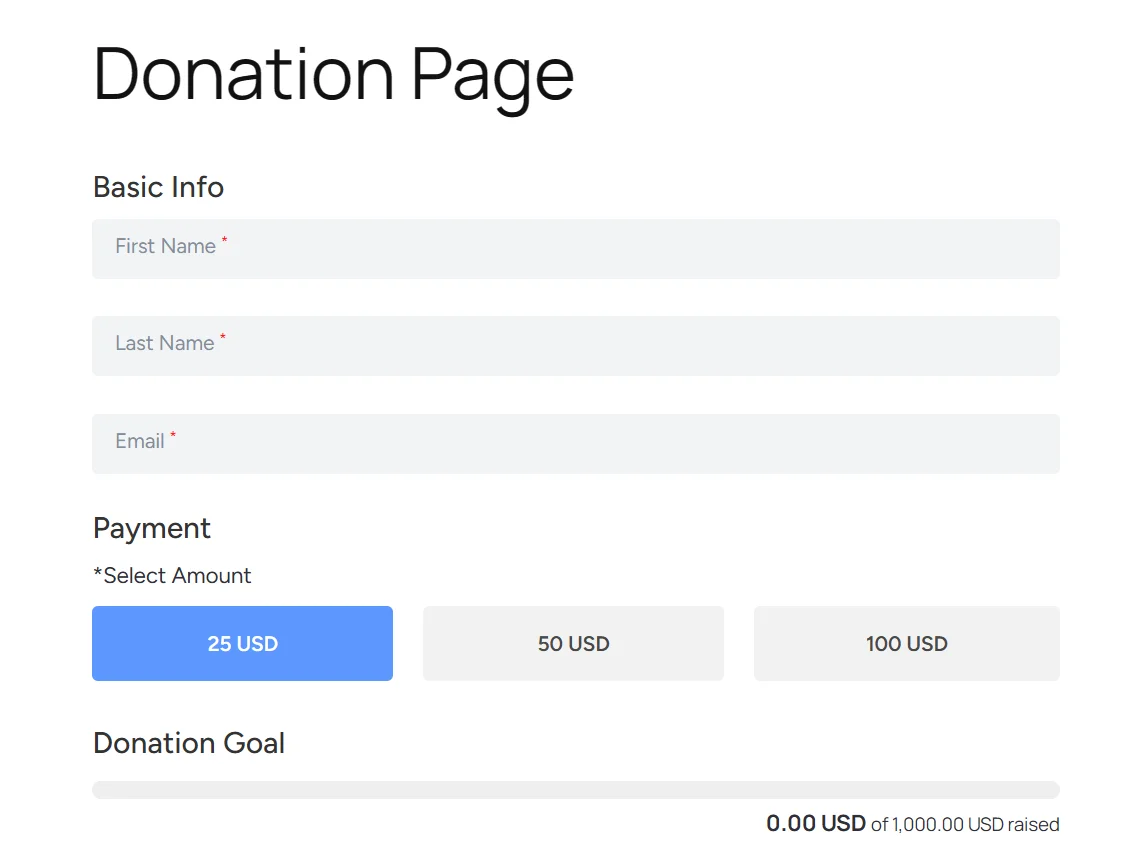
Our donation form makes it simple and flexible to support your mission. You can choose from several recommended donation amounts. Highlighting a recommended donation amount helps reduce decision fatigue and improves donor conversion rates.
Whatever the amount is, each donation will help you continue making a positive difference in the community.
3. Enable Recurring Donations
Recurring donations help nonprofits build predictable fundraising revenue instead of relying entirely on short-term fundraising campaigns or one-time donor contributions.
A donor who gives $50 once is valuable. A donor who gives $25 every month is worth $300 a year, and they’re likely to give for multiple years.
Subscription-style recurring donations build long-term donor relationships that sustain through tough periods.
Why monthly giving outperforms one-time donations:
- Predictable revenue makes budgeting and planning possible
- Monthly donors have a higher lifetime value (typically 4–5x greater)
- Recurring donors are more emotionally invested in your mission and more likely to volunteer, advocate, and refer others
On WordPress, most quality donation plugins support recurring donations natively. The key is making the recurring option visible and functional. Check our guide on how you can add a recurring donation form to your WordPress site.
Best practice: Make a monthly recurring donation form. Use a title similar to “Join our community of monthly supporters”. This is an invitation for the potential donors.
4. Add Trust Signals to Your Website
Before a donor submits payment details, they evaluate one critical factor: trust.
Donor trust plays a critical role in online fundraising conversions. It has to be earned and demonstrated through specific visual and informational cues.
The essential trust signals every nonprofit donation page needs:
- Security badges: Display SSL certificate indicators and payment security logos prominently near your donation form.
- Testimonials and donor stories: Real words from real donors carry far more weight than organizational copy.
- Transparency about fund usage: Donors want to know their gift won’t be misused. Be specific. “85 cents of every dollar goes directly to program delivery” is a very reassuring promise.
- Recognition and credentials: If your organization has earned recognition or third-party validation, showcase it prominently on your nonprofit website and donation pages.
One of the most common reasons donors abandon online giving forms is uncertainty about payment security, nonprofit legitimacy, or how donations will be used.
So focus on building trust.
5. Optimize Your Donation Page for Mobile Users
A poor mobile donation experience can significantly reduce fundraising conversions.
As of 2025, mobile devices account for over 60% of web traffic. When your donor reads your email, feels moved, and taps the donate link, they are using their phone.
What mobile donation page optimization actually means:
- Responsive layout: The form should resize and reflow naturally on any screen size, with no horizontal scrolling.
- Large tap targets: Buttons and form fields should follow mobile accessibility guidelines and remain easy to tap without accidental clicks.
- Fast load times: Every additional second of load time reduces conversions. Compress images, minimize scripts, and consider a lightweight theme.
- Mobile payment options: Apple Pay and Google Pay allow donors to complete a gift with a single tap. These payment processors eliminate the friction of typing out 16 card digits, because they dramatically reduce checkout friction.
Test your donation page on multiple devices and browsers regularly. What looks fine on a desktop can be completely broken on a phone.
6. Offer More Payment Methods
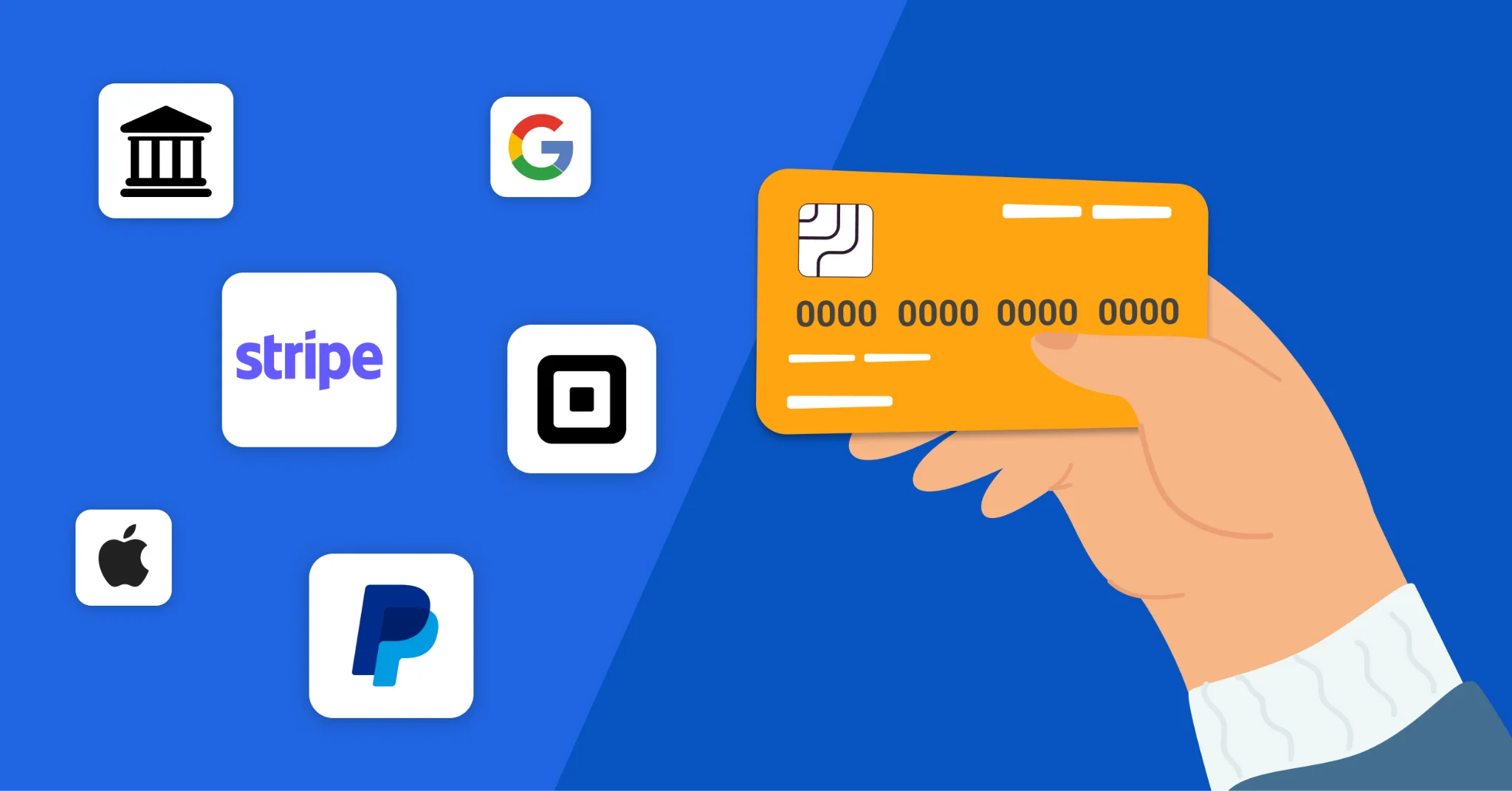
Modern donors expect flexible payment options during the online donation process. If supporters cannot use their preferred payment method, many will leave before completing the transaction.
In 2026, the payment methods your donation page should support:
- Credit and debit cards
- Apple Pay, Google Pay, PayPal, ACH payments, and digital wallets
- Payment gateways such as Stripe, PayPal, and Square
- Bank transfers (ACH Payments)
- International payment methods
The goal is simple: never let the payment process be the reason a donor walks away.
7. Use Strong Donation Calls-to-Action
Your call-to-action (CTA) is the most critical conversion element in your WordPress donation funnel. A strong donation CTA guides supporters from emotional interest to immediate fundraising action. A weak CTA wastes all the work you’ve done to get them to that point.
Most nonprofit CTAs fall into one of two failure modes: they’re either generic, which is why they’re invisible (“Donate Now”), or so aggressive that they create resistance (“Give Before It’s Too Late!!!”).
What makes a donation CTA genuinely effective:
- Emotionally driven language: Connect the act of giving to a specific, human outcome. “Provide clean meals for a family today” creates a stronger emotional connection than generic phrases like “Donate Now.”
- Strategic placement: Your primary CTA button should appear above the fold on your donation page. It should also appear at the end of impact stories, after testimonials, and at natural pause points in longer pages. Strategic donation CTAs improve fundraising conversion rates by guiding supporters toward immediate action.
- Urgency without manipulation: Genuine urgency – a matching gift deadline, a campaign end date, a specific fundraising goal that’s close to being met – is motivating and ethical.
- Button design: The donate button should stand out from the rest of the page through color contrast, size, and placement.
- Test your CTAs: Run A/B tests on button text, color, and placement. Even small changes – “Give $50 Today” vs. “Donate $50” – can produce measurable differences in conversion.
8. Show the Impact of Every Donation
Donors contribute when they clearly understand the real-world impact of their contribution, not just the donation amount itself. The more vividly you can connect a donation amount to a real-world result, the more likely a visitor is to donate.
How to communicate donation impact effectively:
- Tie amounts to specific outcomes: Don’t just list numbers. Tell the story behind them. “$25 provides clean water for one person for an entire year.” These specifics make donations feel real and tangible.
- Use progress bars and campaign goals: Visual indicators of progress create momentum. When a donor sees that a campaign is 73% funded and there’s a deadline approaching, they feel like they might make a difference.
- Share real outcomes and updates: After a campaign closes, show donors what happened. Post photos, share numbers, tell stories.
- The impact calculator: Some nonprofit organizations use donation impact calculators that visually show what different contribution amounts help fund in real-world scenarios.
9. Promote Your Donation Page Everywhere
Even a highly optimized donation page cannot increase online donations without consistent nonprofit marketing and donor outreach. Getting more donations on WordPress requires active, consistent promotion across every channel available to you.
- Your website: Every page of your website is a potential entry point to your donation flow. A sticky header with a “Donate” button is one of the simplest and most effective conversion tools available.
- Social media: Don’t just post your donation link once. Build campaigns around stories, milestones, and matching donation opportunities. Use Instagram Stories, Facebook fundraisers, and short-form video to bring your cause to life.
- Email campaigns: Email marketing continues to deliver one of the highest ROI channels for nonprofit fundraising and donor retention campaigns. A coordinated email campaign can drive more donations in 24 hours than a week of social posting.
- Popups and banners: Exit-intent popups (triggered when a visitor is about to leave your site) can be effective for campaigns. Popups that fire the moment someone lands on a page are annoying and damage trust. Used at the right moment, they work.
Bonus Tips to Increase Donations Faster
Beyond the 9 easy ways, these tactics can also give you a head start:
- Create seasonal campaigns: Year-end giving accounts for a share of annual donations. Plan around these moments with dedicated landing pages and specific goals.
- Use storytelling throughout your nonprofit fundraising campaigns: Emotional storytelling creates stronger donor engagement than statistics alone. Real donor stories and beneficiary experiences often create stronger emotional engagement than statistics alone. Find your stories, tell them consistently, and update them regularly.
- A/B test your donation forms: Don’t assume you know what works best. Test it. Change one element at a time and measure the results. Repeat until it works.
While strategy plays the biggest role in improving fundraising performance, choosing the right WordPress donation plugin also affects donor experience, checkout speed, payment flexibility, and recurring donation management.
How WP Easy Pay Helps You Accept Donations on WordPress
Implementing the fundraising strategies above becomes much easier when your donation plugin supports a fast checkout experience, recurring giving, secure payment processing, and mobile-friendly donation forms.
That is where WP Easy Pay helps nonprofits, charities, community organizations, and fundraising campaigns simplify online donations on WordPress.
Instead of building a complex eCommerce setup, organizations can create dedicated donation forms that reduce friction during the donation process and make giving easier for supporters.
Create Donation Forms Without Technical Complexity
Many nonprofits struggle with complicated donation systems that require multiple plugins, developer support, or lengthy setup processes.
WP Easy Pay helps organizations create donation forms directly inside WordPress without requiring complex technical setup or custom development. This helps smaller teams launch fundraising campaigns faster and focus more on donor engagement instead of technical setup.
Support Recurring Donations for Predictable Fundraising Revenue
Recurring donations help nonprofits build long-term financial stability and improve donor retention over time.
With WP Easy Pay, organizations can offer monthly, quarterly, or annual giving options directly through their donation forms. This makes it easier to build sustainable fundraising programs instead of relying only on one-time donations.
Reduce Donation Abandonment With Faster Checkout
A slow or complicated donation checkout process often causes donors to leave before completing their contribution.
WP Easy Pay supports streamlined payment experiences with digital wallet options such as Apple Pay and Google Pay, helping donors complete their donations faster, especially on mobile devices.
Build Donor Trust With Secure Payment Processing
Trust plays a major role in online fundraising conversions. Donors want reassurance that their payment information remains secure during checkout.
WP Easy Pay supports secure payment processing using SSL encryption and PCI-compliant payment gateways to help organizations create safer donation experiences and build donor confidence.
Improve Mobile Donation Conversions
A growing percentage of nonprofit donations now come from smartphones and tablets. Donation forms that do not work properly on mobile devices can reduce fundraising conversions significantly.
WP Easy Pay uses mobile-optimized donation forms that adapt across screen sizes and devices, helping organizations create a smoother mobile donation experience for supporters.
Flexible Payment Options for More Donors
Different donors prefer different payment methods. Limiting payment flexibility can create unnecessary checkout friction and reduce completed donations.
WP Easy Pay supports multiple payment methods, including credit cards, digital wallets, and modern payment solutions, making it easier for supporters to contribute using their preferred option.
By combining secure payment processing, recurring donation support, mobile-friendly checkout, and flexible donation forms, WP Easy Pay helps nonprofits create a more effective online fundraising experience directly inside WordPress.
Make Donations Simple, Fast, and Trustworthy
Increasing donations on WordPress starts with improving the donor experience. When your donation process feels simple, secure, fast, and trustworthy, more visitors complete their contributions.
Focus on reducing friction at every stage of the donation journey. Simplify your forms, support recurring giving, optimize for mobile users, build donor trust, and clearly communicate the impact of every contribution.
Even small improvements in donation UX and donor checkout flow can improve fundraising conversion rates over time.
If you want to create secure, high-converting donation forms without complicated setup or technical overhead, WP Easy Pay gives nonprofits an easy way to accept secure online donations directly on WordPress.
Frequently Asked Questions
What is the best donation plugin for WordPress nonprofits?
The best way to collect donations on WordPress is to use a dedicated donation plugin that supports secure payment processing, recurring donations, mobile-friendly checkout, and multiple payment methods. Plugins like WP Easy Pay help nonprofits create streamlined donation experiences that improve fundraising conversions.
Why do donors abandon donation forms?
Donors often abandon online donation forms because of long checkout flows, limited payment options, poor mobile optimization, slow-loading pages, or missing trust signals.
Should I allow recurring donations?
Yes. Recurring donations help nonprofits create predictable monthly revenue, improve donor retention, and increase donor lifetime value. Even small recurring contributions often outperform larger one-time donations over time because supporters continue giving consistently.
How do I create a donation form in WordPress?
To create a donation form in WordPress, install a donation plugin such as WP Easy Pay, customize your form, configure your donation amounts and payment settings, and embed the form on your desired page using a shortcode or block.
How can nonprofits increase online donation conversions?
Nonprofits can increase online donation conversions by simplifying the donation checkout process, reducing unnecessary form fields, supporting recurring donations, improving mobile responsiveness, and building donor trust with secure payment processing and transparency. Strong donation CTAs, faster page load times, multiple payment methods, and clearly showing the impact of each contribution also help improve fundraising conversion rates.
What payment methods should a donation page support?
A modern donation page should support multiple payment methods to reduce checkout friction and improve donor convenience. Most nonprofit websites should accept:
- Credit and debit cards
- PayPal
- Apple Pay and Google Pay
- ACH bank transfers
- Digital wallets
- International payment methods where applicable
Offering flexible payment options allows donors to contribute using their preferred method, which can significantly improve donation completion rates.
Why are recurring donations important for nonprofits?
Recurring donations help nonprofits create predictable fundraising revenue and improve long-term donor retention. Monthly donors often contribute more over time compared to one-time donors because they continue supporting the organization consistently. Recurring giving programs also help nonprofits plan budgets more effectively, sustain ongoing programs, and build stronger relationships with supporters.
How do I optimize a donation page for mobile users?
To optimize a donation page for mobile users, use a responsive design that adapts to different screen sizes, simplify the donation form, reduce page load times, and make buttons easy to tap on smaller screens. Supporting mobile-friendly payment methods like Apple Pay and Google Pay can also improve mobile donation conversions by reducing checkout friction during the online giving process.
What makes a high-converting donation form?
A high-converting donation form focuses on simplicity, trust, and ease of use. The most effective nonprofit donation forms usually include:
- Minimal form fields
- Clear donation amounts
- Recurring donation options
- Secure payment processing
- Mobile-friendly checkout
- Multiple payment methods
- Strong donation CTAs
- Trust signals such as SSL badges and testimonials
Donation forms that reduce friction and clearly communicate the impact of each contribution typically generate higher fundraising conversion rates.