



The global subscription economy is expected to reach nearly $1 trillion by 2028, making recurring revenue one of the fastest-growing business models today.
This shift shows how businesses are moving from one-time payments to predictable, recurring revenue models. If you run a WordPress site, subscription payments help you generate predictable recurring revenue while increasing customer lifetime value (LTV) and retention.
However, setting up a WordPress subscription system with recurring billing and automated payments can feel complex without the right tools.
Since WordPress doesn’t include built-in payment functionality, businesses often struggle to implement a WordPress recurring billing plugin or subscription system.
This is where plugins like WP EasyPay simplify the entire process. In this guide, you’ll learn what WordPress subscription payments are, how they drive business growth, and how WP EasyPay simplifies the entire process.
What Are WordPress Subscription Payments?
Before we begin, it’s important to understand what WordPress subscription payments actually are.
Unlike standalone subscription-based platforms, WordPress does not include a built-in payment processor or recurring billing system. Instead, it relies on plugins that enable recurring payments in WordPress and third-party payment processors to enable subscription functionality.
In simple terms, you enable subscription payments in WordPress using payment form plugins such as WP EasyPay.
When properly set up, this model enables benefits such as:
- Automated recurring billing without manual effort
- Steady and predictable income streams
- Improved customer retention through ongoing access to services
For example, solutions like WP EasyPay allow WordPress site owners to automate recurring payments WordPress and integrate subscription billing directly into their website without building a custom system.
How WordPress Subscription Payments Help You Grow Your Business
When you implement recurring payments and subscription billing, you transform your WordPress site into a scalable recurring revenue business model. This is especially useful for building a recurring revenue website WordPress model.
Instead of building a full payment system, owners connect their site to tools like payment gateways through plugins. Once set up, the site can collect monthly payments online through WordPress, manage renewals, and keep subscriptions running in the background.
This subscription model helps you scale faster and build a predictable income:
- Turns your WordPress site into a recurring revenue system: Integrating subscriptions removes the limitation of one-time purchases and supports recurring payments for small business WordPress.
- Reduces the need for manual billing work: Without WordPress subscription payments, transactions often need manual tracking. Using a WordPress subscription billing plugin, payment collection becomes automatic.
- Keeps everything inside WordPress: Pages, user access, and payments all work together through plugins. This makes it easier to manage everything from one dashboard.
This is what makes WordPress subscription payments useful for site owners: a simpler way to manage them within the same platform they already use.
Can WordPress Handle Recurring Payments Automatically?
No, WordPress cannot handle recurring payments on its own. It relies on third-party plugins to automatically accept and manage subscription or recurring payments. These plugins connect your site to payment processors and handle tasks like billing cycles, renewals, and payment collection in the background.
Once set up, the process runs automatically, but the functionality itself comes from the plugin, not from WordPress by default.
Why WP EasyPay Is a Powerful WordPress Subscription Plugin
Since WordPress relies on plugins, choosing the right one makes a big difference. WP EasyPay is built specifically to simplify this process for WordPress site owners.
Here’s why it stands out:
- Simple setup process: Create a subscription form, embed it on your site, and start accepting payments within 4 steps.
- Works seamlessly within the WordPress dashboard: Customers stay on your site during the payment process instead of being redirected elsewhere.
- Handles recurring billing automatically: Once a user subscribes, renewals and payments are managed in the background.
- No need for custom development: You don’t have to build a separate billing system or write code to manage subscriptions.
- Designed specifically for WordPress users: The plugin works with how WordPress sites are built, making it easier to manage everything from one place.
For WordPress users who want a simple, reliable way to accept subscription payments, WP EasyPay offers a practical solution. You can also explore other best payment plugins for WordPress to see how WP EasyPay stands out.
How to Accept Subscription Payments in WordPress
Setting up subscription payments in WordPress is simple when using WP EasyPay. Since WordPress doesn’t handle payments on its own, the plugin takes care of everything for you. If you want a deeper walkthrough on how to create subscription forms in WordPress, check out our detailed step-by-step guide.
To accept subscription payments in WordPress, create a subscription form, connect a payment gateway, and embed it on your site.
Follow this step-by-step guide to set up WordPress subscription payments and start accepting recurring payments online:
Step 1: Install the WP EasyPay plugin
- Head to the WP EasyPay pricing page and purchase any plan.
- You’ll receive a confirmation email with the Premium plugin ZIP file and your license key. Download the ZIP file and copy your license key for further use.
- Go to your WordPress dashboard, then Plugins → Add Plugin → Upload Plugin.
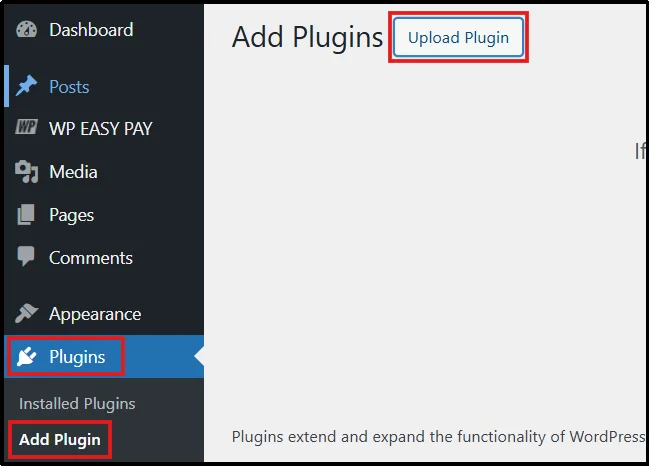
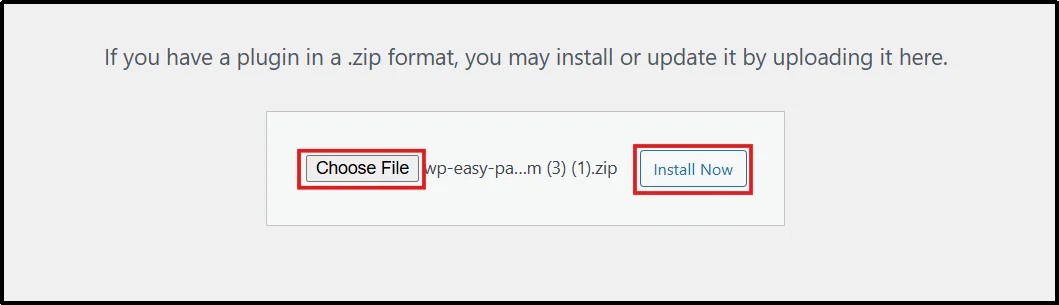
- Select Choose File and pick the correct WP EasyPay Premium ZIP file.
- Click Install now, then Activate it.
- You will see an Activation pop-up. Enter your copied license key and click ACTIVATE LICENSE.
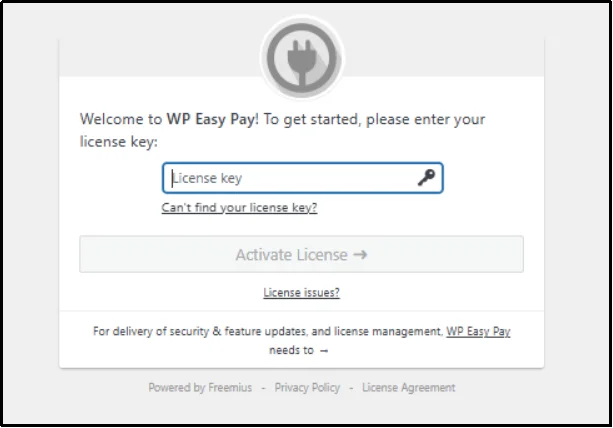
Congratulations! Your WP EasyPay Premium version is now active. It will now appear as a menu item in your WordPress sidebar. All payment features are now unlocked, including subscription payments.
Step 2: Connect Square Account to WP EasyPay
To create a working subscription form, you first need to connect your Square account.
- In your WordPress dashboard, head to WP EasyPay → Square Connect.
- We recommend switching the environment toggle to Sandbox to test it first. You can also learn how to test Square payments before going live for better accuracy.
- Enter your email to set up notifications and click Connect Square.
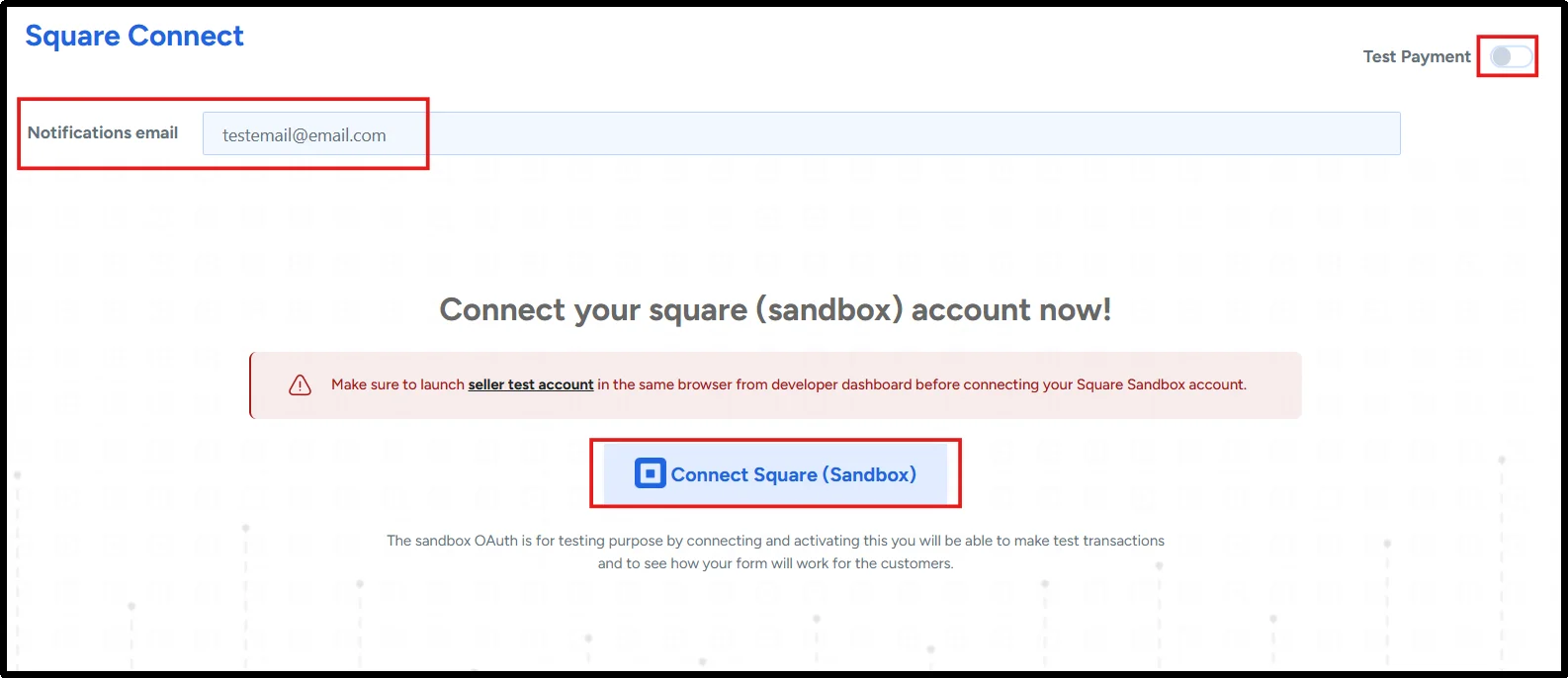
- You’ll be redirected to Square’s login page. Sign in with your credentials.
- Click on THAT’S MY SITE – REDIRECT ME to authorize the connection.

- You will be directed back to your WP EasyPay; click Save Settings.
You have successfully connected to Square payment. You will see a green tick status and a “Square is connected” message on the same screen – Square is connected ✅. If you want to understand how Square works in more detail, check out our guide on the Square payment gateway.
Step 3: Create a Subscription Payment Form
- Go to WP EasyPay → Create Payment Form.
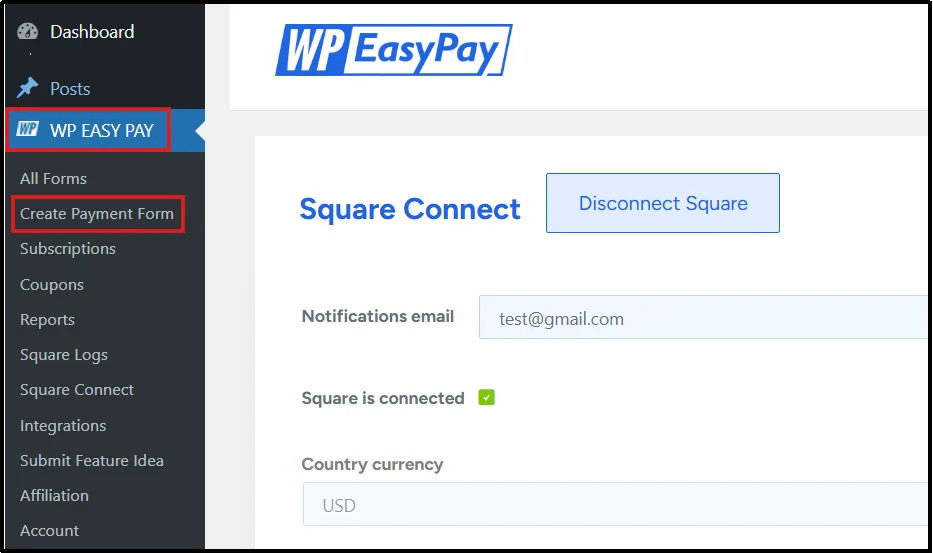
- Under the Form Settings tab, enter a form title, description, and select Subscription Payment under Select Payment Type.
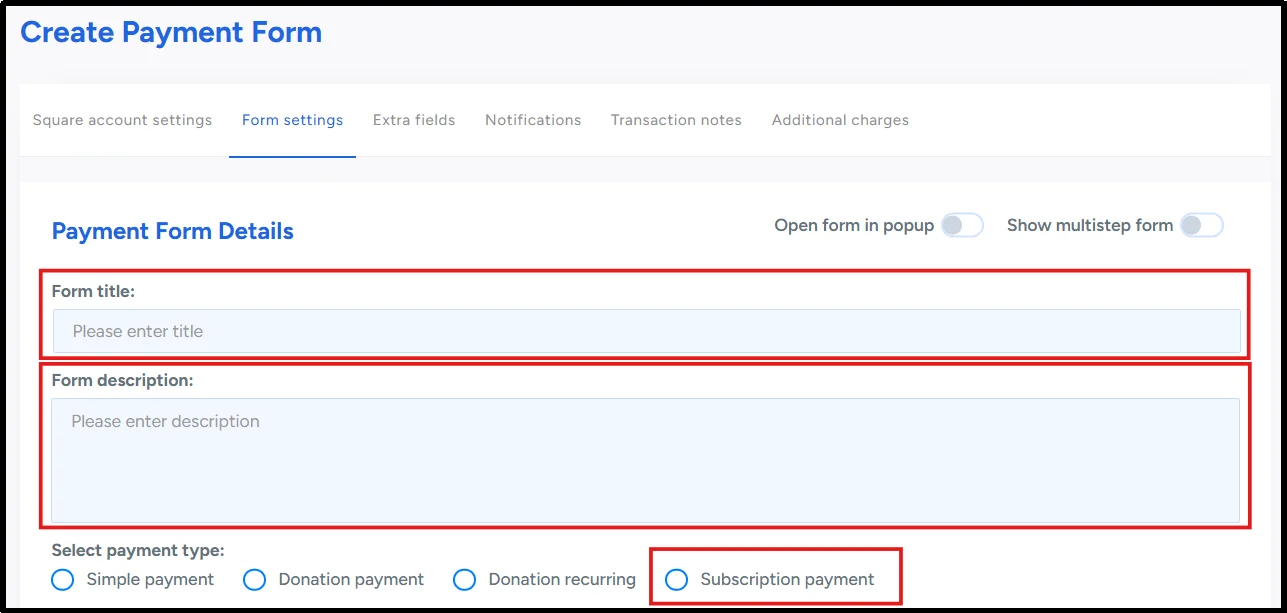
- Set your desired Subscription Cycle and its frequency. For instance, 60 days – 2 times.

- Select the amount type based on your preference, then enter the preset subscription amounts.

- You can write a custom Payment Success Message. Enable redirections on success as YES.
Now that the subscription payment form is ready to use, you can choose and configure form fields by going to the Extra Fields tab at the top, beside form settings.
Step 4: Publish the form and embed it on a Page
- On the right, click the Publish button in the form builder, then copy the shortcode.
- Go to Pages → Add Page → Add Page, or click edit on an existing page.
- Paste the shortcode into the page editor, or type /wpeasypay and select your form.

- Click the Preview button and test the form on all devices – desktop and mobile before clicking Publish.
- Once you’ve tested the form, click Publish to make your subscription form live.
Congratulations! Your WordPress Subscription Payments are now active. Your site can now collect monthly payments online using WordPress and run a fully functional subscription system.
10 Expert Tips & Strategies to Improve WordPress Subscription Payments
Setting up subscription payments is just the first step. To truly grow your business, you need to optimize how WordPress subscription payments perform and retain customers over time. Below are proven strategies to help you get the most out of your WordPress subscription system.
Tip 1: Optimize the Checkout Experience
A complicated or slow checkout process can significantly reduce conversions. Keep your subscription forms clean, minimize required fields, and ensure a smooth, responsive user experience across all devices.
Tip 2: Clearly Communicate Pricing and Subscription Terms
Transparency is key to building trust with your audience. Clearly display your pricing, billing cycles, renewal dates, and cancellation policies. When users fully understand what they’re signing up for, they are more likely to commit.
Tip 3: Offer Flexible Subscription Plans
Offering multiple billing options, such as weekly, monthly, or yearly plans allow users to choose what fits their budget and needs. This flexibility can significantly improve conversion rates.
Tip 4: Provide Free Trials or Limited-Time Discounts
Free trials and promotional discounts reduce the barrier to entry. They give potential customers a chance to experience your product or service before committing to a paid plan.
Tip 5: Use Multiple Pricing Tiers
Multiple pricing tiers (e.g., basic, standard, premium) appeal to everyone, allowing you to target different customer segments and increase average revenue per user (ARPU).
Tip 6: Upsell and Cross-Sell
Your current subscribers are your most valuable audience. Offer upgrades, add-ons, or complementary services to increase their lifetime value.
Tip 7: Collect Customer Feedback Regularly
The most important way to grow is by listening to your customers’ feedback. Use surveys, feedback forms, or email follow-ups to learn what users like and what needs improvement, thereby increasing customer satisfaction.
Tip 8: Track Subscription Metrics
You need to measure and monitor your metrics. Important metrics such as monthly recurring revenue (MRR), churn rate, and customer lifetime value (LTV) help you identify trends, fix issues, and refine your strategy.
Tip 9: Test your Subscription System Before Going Live
Testing your subscription system is something you should never skip. Test it in a staging environment to double-check billing cycles and whether transactions are going through. This helps prevent poor user experiences and errors.
Tip 10: Regularly Update and Maintain your WP EasyPay Plugin
Regularly updating your subscription plugin ensures optimal performance, security, and compatibility with payment gateways. An outdated system can lead to failed payments, bugs, or vulnerabilities that impact your revenue.
Unlock Your Business’s Growth with WP EasyPay
WordPress subscription payments give you a proven way to build predictable recurring revenue, improve customer retention, and scale your business faster.
Choosing the right plugin, such as WP EasyPay, is equally important as investing capital in your business. By using WP EasyPay, you can push your business to the next level. You will have easy access to automated billing, payment collection, and many more features – everything within your WordPress dashboard.
As subscription-oriented business models continue to grow, now is the perfect time to unlock your business growth.
Ready to start generating recurring revenue from your WordPress site?
Get WP EasyPay Pro today and start accepting secure recurring payments, automating billing, and growing your subscription business with ease.
FAQs
Which payment gateways work best for WordPress recurring payments?
Square, Stripe, and PayPal are the most popular payment gateways for WordPress subscription payments. The best option depends on your business needs, location, and preferred plugin compatibility.
How secure are WordPress subscription payment systems?
WordPress itself does not process payments directly, so security depends on the payment gateway and plugin you use. Reliable gateways like Stripe or Square securely handle sensitive payment data, while plugins ensure safe integration with your site.
How do I reduce failed recurring payments on WordPress?
To reduce failed payments, ensure your payment gateway supports automatic retries, keep customers’ billing details up to date, and send reminders before renewal dates. Using a reliable plugin also helps manage failed transactions more effectively.
What are the common mistakes when setting up WordPress subscription payments?
Some common mistakes include not testing payments before going live, choosing the wrong plugin, ignoring failed payment handling, and not clearly defining subscription terms for users.