


Getting paid should be the easiest part of freelancing, but it often isn’t. You finish the project, your client is happy, and then the waiting begins. Chasing invoices, sharing bank details, or relying on personal payment apps creates unnecessary delays and doesn’t reflect a professional business.
In fact, recent studies show that 85% of freelancers experience late payments, while nearly one in five wait for payment more than half the time. A secure payment form on your WordPress website helps clients pay instantly using their preferred payment method, improving cash flow and reducing payment delays.
At WP Easy Pay, we’ve helped thousands of WordPress users simplify online payments with secure Square-powered payment forms.
In this guide, you’ll learn why WP Easy Pay is one of the best WordPress payment form plugins for freelancers and how it helps you accept online payments faster and more professionally.
Reason 1: The Features Freelancers Actually Need for Client Payments

Custom Payment Amounts for Project-Based Work
You don’t sell fixed-price products – every client, every project, every retainer is a different number. WP Easy Pay’s custom amount fields let clients type in exactly what they owe: $500 for a logo, $250 for a website audit, $1,500 for a monthly retainer.
Instead of creating a new invoice for every project, simply send your secure payment form. Clients enter the agreed payment amount, complete the checkout, and receive instant payment confirmation.
Compare that to a plugin, where the same custom amount functionality sits behind a paid Personal plan starting at $49.50/year.
WP Easy Pay’s free version handles it out of the box.
Recurring Payments for Retainer Clients (Pro)
If you work with retainer clients, this is where WP Easy Pay Pro will be extremely useful.
If you work on monthly retainers, maintenance plans, or ongoing consulting projects, automatic recurring payments eliminate monthly invoicing, reduce administrative work, and create predictable recurring revenue for freelancers who work on retainers.
You manage everything from your WordPress dashboard.
Imagine your monthly SEO retainer client: they get billed automatically on the 1st, every month, without you lifting a finger. That’s one more client relationship where you never have to send an awkward invoice email again.
Multi-Step Forms That Collect Details and Payment (Pro)
Many freelancers need to collect project requirements before accepting payment. Multi-step payment forms let clients submit project details, upload information, and complete payment in one smooth workflow.
A photographer, for example, can let a client pick a shoot package, enter the event date, and pay the deposit – all within a single form.
Let Clients Pay Their Preferred Way – Multiple Payment Methods (Pro)
Supporting multiple payment methods reduces checkout abandonment because clients can pay using the option they already trust. WP Easy Pay supports credit and debit cards, Google Pay, Apple Pay, Cash App, Afterpay, ACH bank transfers, and Square gift cards.
A web design client can pay via Google Pay in two taps from their phone – no need to manually type out a 16-digit card number on mobile. Most competing plugins need two or more separate add-ons to cover this range of methods; WP Easy Pay has these integrations ready to use.
Reason 2: Look Like a Pro (Without Looking Like an Agency)

No Redirects – Clients Stay on Your Site
WP Easy Pay processes payments directly on your site through Square’s secure embedded checkout. Clients complete payments without leaving your website, creating a smoother checkout experience and helping maintain trust throughout the payment process.
If your portfolio has a “Hire Me” button, it can open a WP Easy Pay form right there; the client pays without leaving your website.
Fully Branded Payment Forms
Match your payment form to your website’s branding with customizable colors, layouts, typography, and page builder integrations, creating a consistent customer experience from start to finish.
A form that looks like your site signals “A real business,” rather than “A sloppy payment form on your primary website.”
Drag-and-Drop Setup in Page Builders (Pro)
If you build your site in WordPress, creating a “Pay for Your Project” page is as simple as dragging in the WP Easy Pay widget. Just create a simple form or edit your existing one, drag the fields and drop them where you want them, and then publish.
Branded Payment Receipts and Confirmations
WP Easy Pay sends branded payment confirmations automatically, so clients get an immediate, professional-feeling payment record the moment they pay. This matters more than it sounds, especially for a new client sizing you up, helping reinforce your professionalism and giving clients immediate proof of payment.
Reason 3: Keep More of What You Earn

A Genuinely Useful Free Version
WP Easy Pay’s free version on WordPress.org isn’t a useless trial. It includes custom amounts, one-time payments, Square integration, and Elementor support at no cost. Compare that to the entry-level pricing on competing plugins:
- WP Simple Pay: Personal plan starts at $49.50/year just to unlock on-site forms and custom amounts
- WPForms: Payment fields require the Pro plan at $199.50/year; lower tiers add a 3% platform fee on top of whatever your processor already charges
- WP Easy Pay Free: $0
A Pro Plan You Buy Once, Not Rent Forever
WP Easy Pay Pro also offers lifetime premium plans for unlocking all additional features, including recurring payments, multi-step forms, and subscription management.
Instead of renting features yearly, the way most WordPress plugins do, you invest once and own it. It doesn’t eat your freelance income in the background; that’s already inconsistent enough.
Square’s Transaction Charges
WP Easy Pay is powered by Square, which charges standard transaction fees based on your payment method and account plan. Always check Square’s latest pricing before calculating your payment processing costs.
The important part for freelancers: WP Easy Pay doesn’t take any additional platform fee on top of what Square already charges. Compare that to WPForms, which applies an additional 3% payment processing fee when you use WPForms Lite or an inactive Pro license, on top of the standard payment processor fees.
WP Easy Pay vs. Other Payment Plugins (Freelancer Edition)
| Feature | WP Easy Pay | WP Simple Pay | WPForms | WooCommerce | MyPayKit |
| Primary Payment Gateway | Square | Stripe only | Stripe, PayPal, Square | Works with almost any gateway | Square |
| Free Tier | Yes | Limited | Limited | Free core plugin | No |
| Pricing | One-time Pro purchase (no recurring fee) | Starts at $49.50/year | $199.50/year for payment fields | Free core, but typically $200+/year in extensions | Starts at $49.50/year |
| Multi-Step Payment Forms | Included | Available only on higher-tier plans | Available with Pro | Requires additional setup/plugins | Limited |
| On-Site Checkout | No redirects | Lower plans use Stripe Checkout redirects | On-site with Pro | On-site (depends on gateway) | On-site |
| Subscriptions | Included | Supported | Supported with appropriate plan | Supported via extensions | Limited |
| Page Builder Support | Native Elementor & Beaver Builder support | Basic | Integrates with major builders | Theme/builder dependent | More limited integrations |
| Best Fit for Freelancers | Purpose-built for simple payment forms without eCommerce overhead | Good for Stripe-only businesses | Best if you already use WPForms Pro | Better suited for full online stores than service businesses | Suitable for basic Square payments, but fewer integrations than WP Easy Pay |
For a freelancer specifically, one secure payment form, project-based amounts, the occasional retainer, WP Easy Pay’s free tier or one-time Pro purchase is hard to beat on price alone.
How to Add WP Easy Pay to Your WordPress Website
You can install WP Easy Pay and start creating payment forms in just a few minutes.
Follow the steps in order below:
- Go to your WordPress site dashboard.
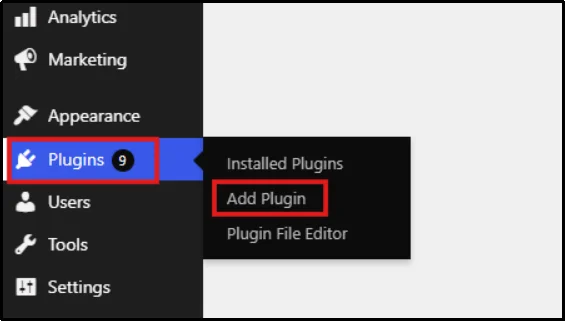
- In the dashboard, hover over Plugins, then click on Add Plugin.
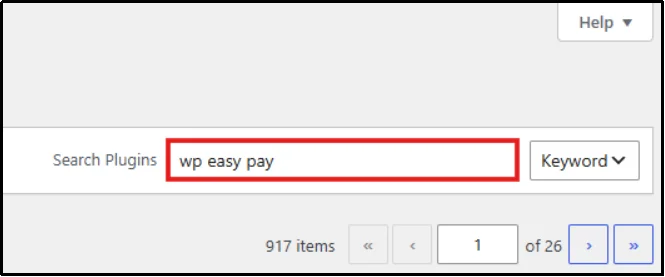
- Enter “WP Easy Pay” in the search bar located on the top right.
- Click Install Now on the plugin. After a few seconds, the button will change to Activate.
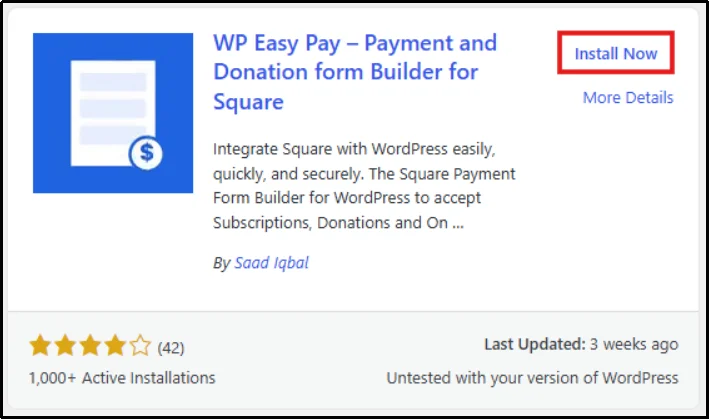
You’ve now successfully installed the free version of the WP Easy Pay plugin.
To install the premium version of the WP Easy Pay plugin, follow the steps below:
Remember, if you are planning to install WP Easy Pay Premium, you must deactivate the Free version!
Here’s how you can install the Pro version.
- Visit WP Easy Pay pricing page and purchase a plan.
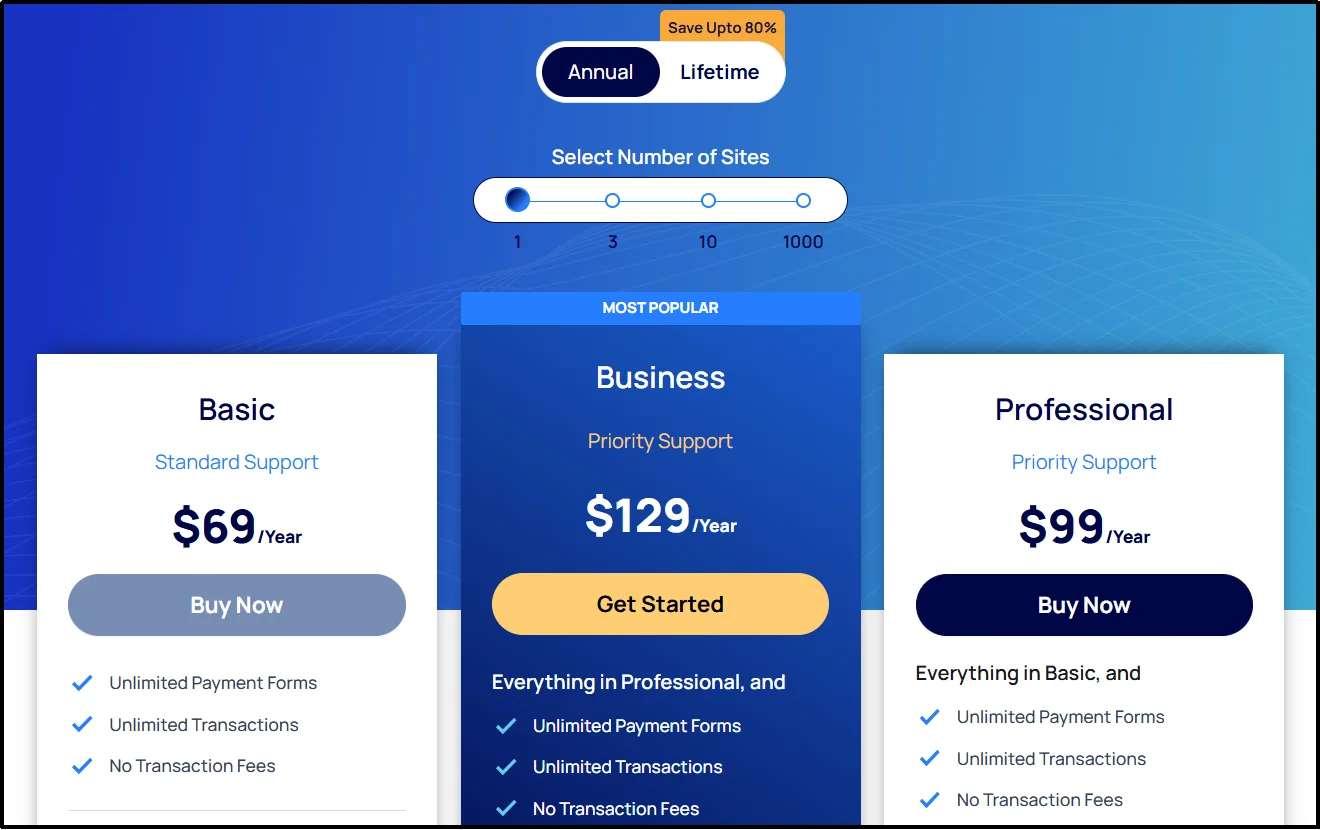
You will receive an email containing the Pro plugin ZIP file and license key. Keep both for later use.
- Go to the WordPress dashboard, hover over Plugins again, and click on Add Plugin.
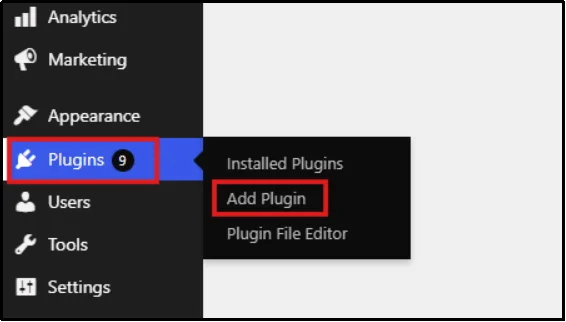
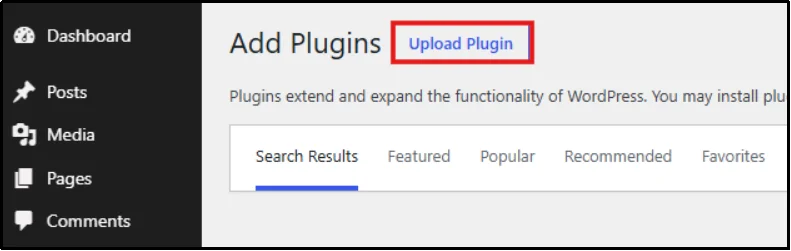
- On the top left, click the Upload Plugin button.
- Choose the downloaded ZIP file for WP Easy Pay Pro.
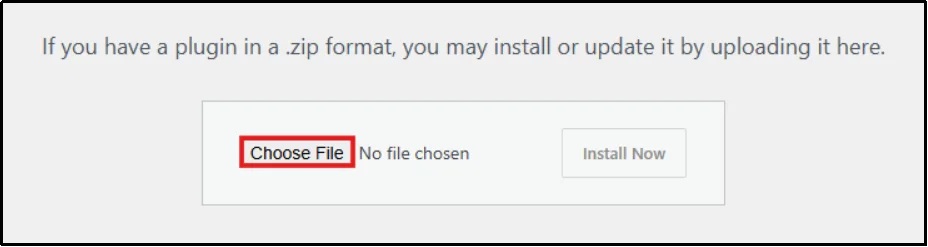
- Now click on Install Now. An activation popup will appear. Paste your license key and click Activate License.
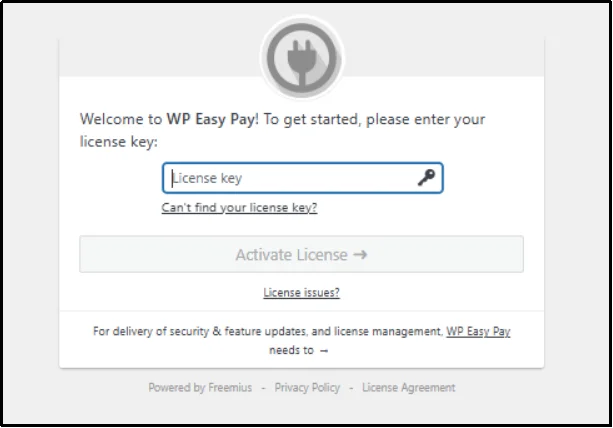
WP Easy Pay will now appear as a menu item in your WordPress admin sidebar. All additional features are now unlocked.
Check out these step-by-step guides to create the payment form you need.
👉 How to Make a Payment Form in WordPress [Step-by-Step]
👉 How to Set Up a Private Payment Form in WordPress [4 Steps]
👉 How to Create a Gym Membership Form in WordPress (Step-by-Step)
👉 How to Create a Recurring Donation Form in WordPress [Step-by-Step]
👉 How to Create Subscription Forms in WordPress [Step-by-Step]
Best Use Cases for WP Easy Pay: Who Can Benefit the Most?
WP Easy Pay is ideal for freelancers and service-based professionals who want to accept payments online without setting up a full eCommerce store. You can create a seamless and professional payment experience directly on your WordPress website.
- Web Designers: Collect project deposits, milestone payments, and final balances through branded payment forms instead of sending manual invoices.
- SEO Consultants: Accept one-time payments for SEO audits or automate recurring payments for monthly SEO retainers and ongoing optimization services.
- Marketing Agencies: Receive payments for social media management, PPC campaigns, content marketing, branding, and other client services while collecting project details with multi-step forms.
- Business Coaches: Let clients book coaching sessions, pay for consultation packages, or subscribe to recurring coaching programs through a single payment form.
- Tutors and Online Educators: Accept payments for private lessons, online classes, workshops, tutoring sessions, or membership-based learning programs.
- Freelance Writers and Content Creators: Get paid for copywriting, blog writing, editing, ghostwriting, or content strategy services through secure, professional payment forms.
- Graphic Designers: Collect payments for logo design, branding projects, illustrations, and creative services using custom payment forms tailored to each project.
- Virtual Assistants: Collect payments for administrative support, ongoing retainers, consulting hours, and monthly service packages through secure payment forms.
No matter your profession, if you sell services instead of physical products, WP Easy Pay provides a simple, secure, and professional way to accept payments directly from your WordPress website.
Your Freelance Site Should Make You Money
Getting paid shouldn’t involve chasing invoices, sharing bank details, or relying on multiple payment apps. With WP Easy Pay, you can accept online payments directly from your WordPress website through secure, branded payment forms powered by Square.
Whether you’re a freelance designer, developer, writer, consultant, coach, or other service-based professional, WP Easy Pay makes it easy to collect one-time payments, recurring retainers, deposits, and subscriptions without the complexity of a full eCommerce platform. Your clients enjoy a faster checkout experience, while you benefit from quicker payments, improved cash flow, and a more professional online presence.
Ready to simplify your payment process? Download WP Easy Pay for free today, or upgrade to Pro to unlock recurring payments, multi-step payment forms, subscription management, and advanced features that help you grow your freelance business.
Frequently Asked Questions
Is WP Easy Pay free for freelancers?
Yes. The free version includes custom payment amounts, one-time payments, Square integration, and Elementor support. Some advanced features are available only in WP Easy Pay Pro.
Does WP Easy Pay work with Square?
Yes, WP Easy Pay is built specifically on Square’s payment infrastructure, so you get Square’s rates, reporting, and deposit options.
Can I accept recurring payments as a freelancer?
Yes, with WP Easy Pay Pro. Set a billing cycle once, and Square handles automatic renewals, with the subscription visible and manageable from your WordPress dashboard.
Do I need WooCommerce to use WP Easy Pay?
No. WP Easy Pay lets you create standalone WordPress payment forms without setting up a WooCommerce store.
Can freelancers accept payments without WooCommerce?
Yes. WP Easy Pay lets freelancers create standalone payment forms without installing or configuring WooCommerce.
What payment methods can freelancers accept?
Freelancers can accept credit cards, debit cards, Google Pay, Apple Pay, Cash App Pay, ACH bank transfers, Afterpay, and Square Gift Cards through WP Easy Pay.
Is WP Easy Pay PCI compliant?
Yes. WP Easy Pay uses Square’s secure payment infrastructure, helping businesses process payments without storing sensitive card information on their WordPress website.
Can I collect project deposits?
Yes. You can create custom payment forms for deposits, milestone payments, final invoices, subscriptions, retainers, or one-time services.