

If you’re running a nonprofit or any charitable organization that accepts donations or payments through WordPress, one thing is certain: every contribution counts. Whether it’s a one-time payment that fuels a project or recurring donations that keep your mission alive, the way you collect those funds can make or break your success.
The truth is, even small improvements to your donation or payment process can have a huge impact. In fact, studies show that simplifying your online giving experience can increase donations by up to 35%. That means a smoother, more optimized flow doesn’t just make your donors’ lives easier; it helps you raise significantly more money.
WordPress makes this easier than ever.
It’s flexible, widely trusted, and home to countless plugins that help you accept payments, design donation forms, and track results.
But installing a plugin isn’t enough. To truly succeed, you need to optimize the experience, remove friction, build trust, and guide every visitor smoothly from “I want to help” to “Thank you for your support.”
In this guide, we’ll explore 12 proven tips to boost donations and payments—so you can increase your WordPress donation payments, master donation tips, and fully optimize your WordPress payment forms for better results.
1. Choose the Right Payment Solution
The first step to increasing donations on WordPress is building a strong foundation, and that starts with your payment infrastructure. The smoother and more reliable your payment system is, the easier it becomes for supporters to complete their transactions without hesitation.
That’s why choosing a dedicated WordPress payment solution is essential. One powerful option that stands out is WP EasyPay—designed specifically to simplify and streamline the donation and payment process.
Here’s what makes it a game-changer:
- Easy WordPress integration: Install the plugin, connect your Square account, and start accepting donations or payments within minutes—no complex setup required.
- Multiple payment methods: Give your donors flexibility by accepting credit cards, Apple Pay, Google Pay, ACH, and even recurring payments. More options mean fewer drop-offs and more completed transactions.
- Built-in recurring support: Set up subscriptions or monthly giving programs with ease. Consistent, predictable income helps organizations plan better and sustain their mission long-term.
- Clean, user-friendly forms: WP EasyPay’s optimized WordPress payment forms minimize friction and reduce abandonment, helping you boost donations on WordPress effortlessly.
Once you’ve got the right payment system in place, you’ll notice smoother checkouts, happier donors, and a more reliable stream of support.
2. Design a Professional and Trustworthy Website
Your website makes the first impression long before someone clicks “Donate.” A polished, trustworthy design can turn curiosity into contribution. A clean, modern layout builds trust and encourages visitors to give, while a cluttered or outdated site can have the opposite effect.
Here’s what to focus on:
- Modern design: Keep your layout clean and consistent with your brand colors, typography, and imagery. Simplicity signals professionalism.
- Mobile optimization: With over 55% of web traffic coming from mobile devices, your site must look and function flawlessly on phones and tablets. So if your donation form isn’t mobile-friendly, you’re missing out on a golden opportunity.
- Social proof and trust signals: Display testimonials, partner logos, media mentions, or donor shout-outs. These subtle cues show legitimacy and reassure visitors that their contributions are in good hands.
- Transparency and storytelling: A well-crafted “About” page that clearly explains your mission, team, and impact can be a deciding factor for donors. People give to people, not faceless websites.
- Security and reliability: Use HTTPS and secure hosting. A visible padlock icon in the browser builds subconscious trust before a visitor even clicks “Donate.”
Take inspiration from trusted organizations whose websites combine stunning visuals, clarity, and transparency, all while making it effortless to give. You don’t need a huge budget to achieve the same level of polish. Just thoughtful design and consistent attention to detail.
When your website looks trustworthy, works smoothly, and communicates authenticity, you create the perfect environment to inspire generosity and increase donations.
3. Make Donation Payment Forms Easy to Find and Use
Even the best payment plugin and most beautiful website won’t help if people can’t easily find your “Donate” or “Pay” button, or if the process feels like a chore. Convenience is everything when it comes to conversions.
Here’s how to make it effortless:
- Place a clear and visible call-to-action (CTA) button (e.g., “Donate”) in your website’s main navigation, so it’s always accessible.
- Add one in the footer too, perfect for visitors who scroll to the bottom looking for ways to give.
- Consider a sticky (floating) button or a well-timed pop-up that appears when users are most engaged.
- Include call-to-action banners or buttons on key pages like blog posts, event updates, or impact stories. These are natural touchpoints where emotion and intent align.
- Use strong, action-oriented labels such as “Donate Now,” “Make a Payment,” or “Support Our Cause” to remove any guesswork.
- Don’t bury your donation form deep within multiple pages. Keep it one click away.
- Ensure the form loads quickly and works flawlessly on both desktop and mobile.
- Use clear, straightforward CTA instructions (“Enter amount → Submit donation”) instead of vague labels.
- Opt for a one-page form when possible, especially for mobile users. Less friction means more completed donations.
Why does this matter? Because the average nonprofit donation form converts at just 17%, meaning nearly 8 out of 10 visitors leave without donating. That’s a huge missed opportunity that you can avoid simply by making your forms visible, intuitive, and fast.
4. Keep Forms Simple and User-Friendly
Once a visitor reaches your donation or payment form, your job is simple: Don’t make them think too hard. Every extra step, field, or confusing label increases the chances they’ll give up halfway. The goal is to make giving feel effortless.
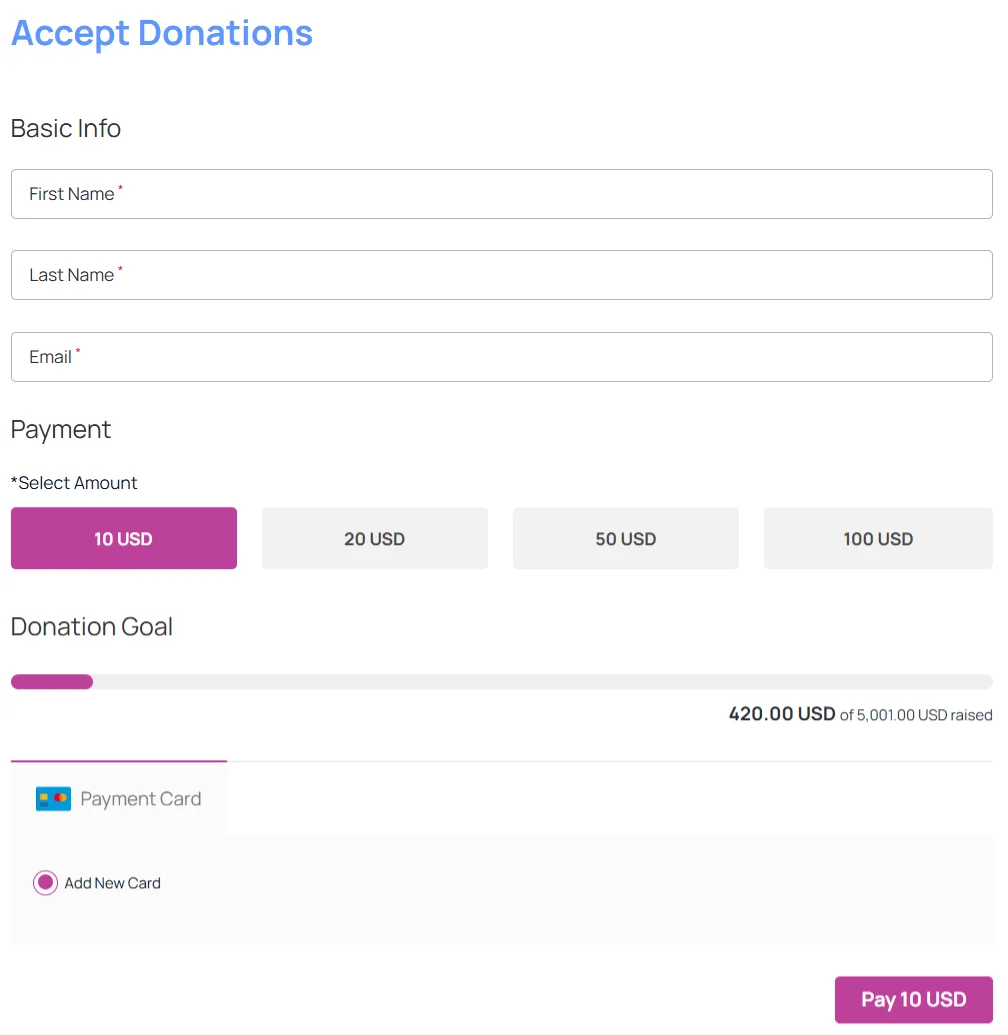
Here’s how to do it right:
- Ask only for what’s essential: Keep required fields to basics like name, email, amount, and payment details. Anything else, like phone number or address, should be optional.
- Break long forms into smaller steps: Multi-step forms feel lighter and more manageable (for example, Step 1: Choose amount → Step 2: Add payment details). WP EasyPay makes this simple with built-in multi-step (tabular) form functionality.
- Respect privacy preferences: Give donors the choice to remain anonymous or share minimal information. Some people are more likely to give when they can do so quietly.
- Use clear labels and helpful placeholder text: Instead of generic “Enter info,” say things like “Email address” or “Enter amount (USD)” to reduce confusion.
- Write friendly, human error messages: Replace robotic “Error” with “Please enter a valid card number.”
- Optimize for mobile: Large tap-friendly fields, minimal scrolling, and easy keyboard navigation make a huge difference on smaller screens.
- Add default or suggested amounts: Pre-filling common donation amounts speeds up decisions.
Simplifying your forms isn’t just a design choice. It’s one of the most effective WordPress donation tips for boosting conversions. A clean, intuitive payment form creates trust, reduces hesitation, and helps you boost donations on WordPress consistently.
5. Offer Multiple Payment Methods
When it comes to collecting payments or donations, one size definitely doesn’t fit all. Different people have different preferences. Some want to use their credit card, while others prefer a digital wallet. Offering diverse payment options creates a smoother experience that keeps people from dropping off at checkout.
How to put this into action:
- With WP EasyPay, you can easily enable multiple payment types, including credit cards, digital wallets, and even Square gift cards, all within one plugin.
- Use recognizable payment icons (like Visa, MasterCard, Apple Pay) on your form to build instant trust and clarity.
- If you receive support from multiple regions, consider offering local currencies or bank transfer options to make giving more personal and convenient.
By giving your donors and customers the freedom to pay their way, you remove friction, increase confidence, and naturally boost donations on WordPress.
6. Enable Recurring Donations & Payments
One-time payments are great, but recurring donations are what truly sustain your mission. Recurring donors typically give more over time and stay engaged longer. This steady, predictable revenue helps you plan ahead, invest in long-term projects, and reduce the constant pressure of fundraising.
How to make it work:
- Add a simple checkbox or toggle on your form: “Make this a monthly gift” or “Set up recurring payment.”
- Use clear, inspiring messages like “Just $10/month provides meals for a family in need.”
- Highlight the impact of ongoing support. Show donors how their monthly commitment fuels consistent change.
Adding recurring options is one of the most powerful ways to boost donations on WordPress, turning occasional givers into long-term supporters.
7. Showcase Impact & Transparency
People want to know their contribution makes a real difference. Whether they’re donating to a cause or making a payment toward a project, seeing real results builds trust and inspires them to give again.
Here’s how to make your impact visible:
- Share real stories: Highlight the people or communities you’ve helped. Use before-and-after visuals or heartfelt narratives that connect emotionally.
- Show results with numbers: Simple stats like “Your gifts helped feed 5,000 children in the last 90 days” or “$50 provides clean water for a family” make your impact measurable and credible.
- Feature donor and beneficiary testimonials: Video clips, quotes, or short written stories bring authenticity and relatability.
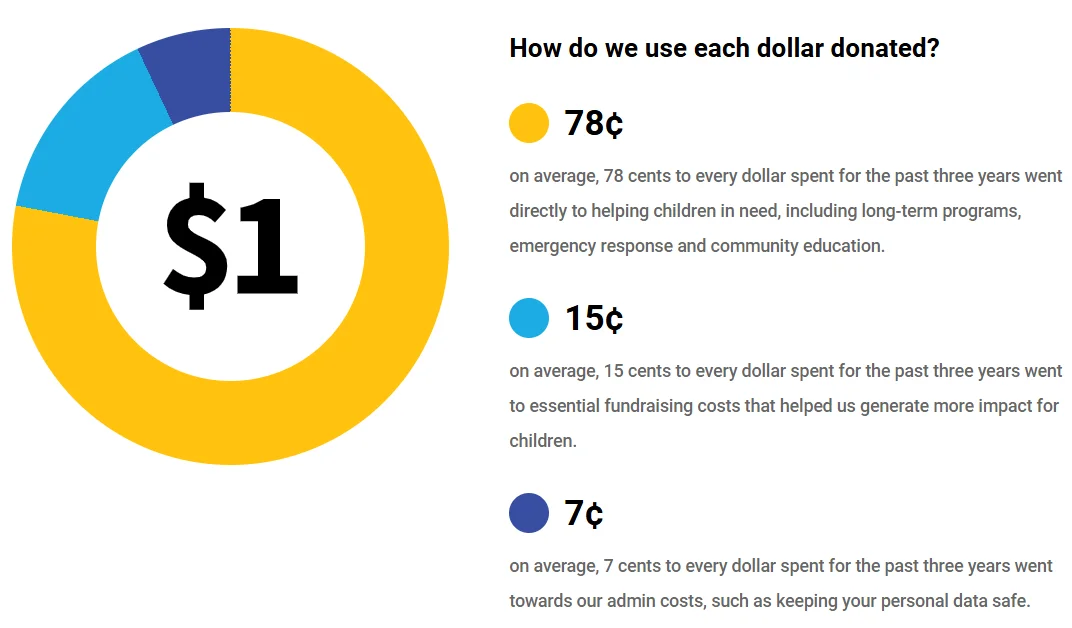
- Be transparent about finances: Add a clear “Where Your Money Goes” section showing how each dollar is spent (e.g., 80% to programs, 15% to admin, 5% to fundraising).
- Keep donors updated: Use emails, blog posts, or dashboards to share ongoing progress and success stories.
When people see where their money goes and the lives it touches, they feel part of your mission and not just supporters. This transparency turns one-time donors into long-term advocates and helps you boost donations. UNICEF Australia provides an excellent example by offering a clear breakdown of how each dollar they receive is spent.
8. Feature and Acknowledge Donors & Customers
Recognition builds connection. People who give or pay want to feel seen and appreciated, and acknowledging them not only strengthens their bond with your organization but also inspires others to contribute.
Here are some simple ways to show appreciation:
- Add an “Our Supporters” page or a rotating section on your homepage featuring donor names or logos (with permission).
- Send automated thank-you emails right after each donation or payment. (WP EasyPay makes this easy with built-in notification features.)
- Follow up later with impact updates that start with messages like “Because of you…” to remind supporters of their contribution’s value.
- Offer digital badges, certificates, or shareable graphics that donors can post on social media.
A little gratitude goes a long way. When people feel valued, they’re far more likely to stay engaged, and that loyalty naturally helps boost donations and payments on WordPress over time.
9. Use Suggested & Custom Amounts
A great payment form offers both suggested amounts and a custom option, providing clarity for those who need guidance and flexibility for those who want control. Suggested amounts (e.g., $25, $50, $100) provide helpful reference points and reduce decision fatigue, while a custom amount option empowers generous givers to contribute beyond preset limits.
How to implement it effectively:
- Offer 3–4 preset options, like $10, $20, $50 and $100.
- Always include an “Other” or “Your own amount” field.
- Make input fields mobile-friendly (numeric keypad for phones).
- Avoid pre-selecting an amount. This lets users choose freely without pressure.
Smart use of suggested and custom amounts helps users act with confidence, reducing hesitation and increasing conversions across your WordPress payment forms.
10. Optimize with Targeted Campaigns
Optimizing your WordPress payment forms isn’t just about design. It’s about delivering the right message to the right audience at the right time. Tailored campaigns turn casual visitors into committed supporters.
Here are some smart tactics to try:
- Use pop-ups or floating bars: Use pop-ups or floating bars to present donation or payment options at key moments, such as after reading an impact story or before exiting the page.
- Segment your audience: Create personalized experiences for new vs. returning donors, one-time vs. recurring givers, or event participants vs. general supporters.
- Run special appeals: Matching gifts, milestone goals (“Help us reach $50K”), or countdown-style urgency campaigns.
- A/B test everything: Experiment with headlines, suggested amounts, imagery, and CTAs to discover what converts best.
When campaigns are targeted and data-driven, your donation forms become more dynamic, your message more relevant, and your conversions stronger.
11. Prioritize Security and Compliance
Trust is everything. If donors or customers doubt the safety of your payment process, they’ll hesitate or leave. A secure and compliant system not only protects data but also builds confidence and credibility.
Here’s what you should do:
- Use SSL encryption: Ensure your site runs on HTTPS, especially on donation and payment pages.
- Ensure PCI compliance: Choose payment solutions like WP EasyPay + Square that meet security standards and manage sensitive card data safely.
- Add reCAPTCHA or bot protection: Prevent spam and fake transactions that can skew analytics and harm credibility.
- Publish a clear privacy policy: Explain how you collect, use, and protect donor or customer information.
- Be transparent about fees: Clearly communicate processing fees or total payment amounts to avoid surprises.
- Optimize for mobile and performance: Slow or glitchy forms can kill conversions. Studies show mobile-optimized forms can boost conversions by up to 15%.
Strong security and transparency inspire trust, and trust drives conversions.
12. Test, Analyze, and Optimize
Your donation or payment setup shouldn’t be static. It should evolve as you learn more about your audience. Continuous testing and optimization turn a good payment experience into a great one.
Here’s how to refine your process:
- Track performance: Use tools like Google Analytics or your plugin’s built-in reports to monitor conversions, drop-offs, and form abandonment.
- Simplify your form: Identify fields that slow users down and remove anything non-essential.
- Run A/B tests: Experiment with headlines, suggested amounts, visuals, and call-to-action text (“Donate Now” vs “Give Today”) to see what converts best.
- Review user behavior: Compare mobile vs. desktop performance and analyze which payment methods your audience prefers.
- Schedule regular reviews: Export your data monthly or quarterly and adjust based on trends.
By treating your setup like a test lab and optimizing regularly, you systematically improve your results and continually boost conversions and build lasting trust with your supporters.
Turn Insights into Action
At the end of the day, great donation and payment experiences come down to three things: trust, simplicity, and connection. When your forms are easy to find, simple to use, and backed by transparency and security, people are more likely to complete their journey and come back again. Keep refining, testing, and improving, and you’ll see your WordPress payments grow naturally over time.
Ready to put these tips into action? Try WP EasyPay. It’s a simple, secure, and fully integrated payment solution for WordPress. With features like multi-step forms, recurring payments, and built-in reporting, it’s everything you need to streamline donations and grow your impact.
Start optimizing your payment experience today because every smooth transaction brings you one step closer to your mission.